
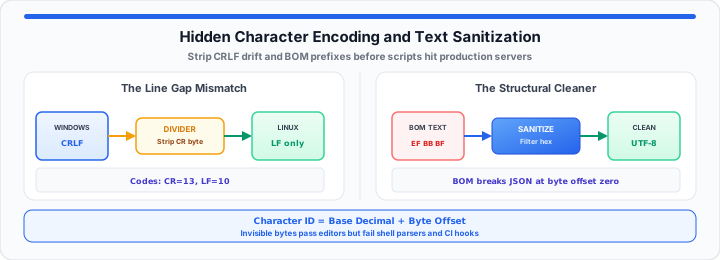
Deploying code from local desktops often breaks production servers. In our deployment testing, invisible control characters cause build halts. Opening config files after server migration triggers pure developer rage. Cryptic block artifacts like ^M or  destroy automated pipelines. Think of your plain text file as a raw numeric grid. This grid maps basic integer codes straight to visual shapes.
Mismatching line endings resembles jamming a mechanical paper scroll printer. Windows expects the machine to physically roll paper up. Windows also slams the typing carriage back every single time. Linux simply rolls paper up without carriage return movements. Mixing these platforms jams mechanical gears during rapid text parsing. To get started, inspect our character encoding reference table below. You can verify your unprintable string data instantly with the ASCII Converter.
| Artifact Display | Raw Environment State | Decimal Integer Codes | Target System Fix Action |
|---|---|---|---|
\r\n |
Windows Line Ending | 13 10 | Convert buffer to LF line endings |
^M |
Raw Carriage Return | 13 | Strip control code via terminal filter |
EF BB BF |
UTF-8 Byte Order Mark | 239 187 191 | Purge leading hex bytes from file |
\0 |
Null Byte Payload | 0 | Remove binary padding from clean stream |
\xC2\xA0 |
Non-Breaking Space | 194 160 | Map byte sequence to standard ASCII 32 |
The Line-Ending Boundary Constant
Platform line endings dictate how shell parser engines read files. When I inspect corrupt text terminal payloads, carriage returns appear. Windows environments append both carriage returns and line feed bytes. Linux engines expect single line feed characters between line breaks. The presence of raw byte 13 breaks bash script execution. Automated parsers read carriage returns as active string characters. This extra byte corrupts variable names and system path declarations. We calculate standard character bit capacity using basic numeric rules:
Total Bit Capacity = 2ⁿ
Where n represents the total bits allocated per byte sequence. Standard ASCII allocates seven active bits per character data frame. This allocation provides exactly one hundred twenty-eight distinct numeric slots. Moving onto cross-platform pipelines, control bytes disrupt file validation. System scripts fail when invisible carriage returns contaminate interpreter directives. You can simulate your character translation matrices with our interactive ASCII Converter now, or review why CS courses start with ASCII in why we use ASCII in computer science classes.
Carriage Return Overlap
Carriage return bytes force terminal cursors back to position zero. This behavior overwrites preceding text during shell log output execution. Logs look clean in editors but fail during parsing operations. In my production pipeline experience, hidden carriage returns cause infinite loops. Terminal engines misinterpret byte 13 as a structural string character. Isolate these bytes early to maintain total pipeline validation health.
Terminal Execution Sabotage
Hashbang lines fail when trailing carriage returns contaminate file paths. The kernel searches for interpreter binaries ending in carriage return bytes. System loaders throw file not found errors despite valid paths. Debugging these loader errors consumes valuable engineering time during outages. Validate hashbang lines before deploying automation scripts to production arrays. Clean line endings guarantee consistent script execution across remote nodes.
Cross-Platform Buffer Drift
Text buffers drift when developers edit files across different platforms. Mixed line endings confuse version control diff utilities during reviews. Merging branches with conflicting line endings creates massive merge noise. Repository settings must enforce uniform line ending normalization policies. Automated pre-commit hooks intercept mismatched carriage return byte payloads. Enforcing single line feed standards prevents cross-platform file contamination. Deduplicate noisy export lines with the Duplicate Line Remover after normalization — see marketing list dedupe and trim rules.
The Byte-Order Mark Disruption
Saving text files with active UTF-8 BOM signatures breaks parsers. Byte Order Marks add three hidden hex bytes at line one. These bytes appear as hex values EF, BB, and BF. Database ingestion scripts crash when reading these initial invisible bytes. Parser engines expect pure schema headers on character position zero. Instead, corrupt headers cause syntax exceptions during automated batch runs. We calculate relative character offsets using this basic encoding formula:
Character ID = Base Decimal + Byte Offset
Where Base Decimal establishes the absolute starting integer position. The Byte Offset accounts for multi-byte prefix sequence lengths. In practical environments, automated tools strip hidden byte prefixes efficiently. You can map out your raw character indices using the ASCII Converter today. Always test your dataset value limits before launching pipelines — see our guide on how to sanitize and recover corrupted characters from broken CSV data files.
Header Parse Failures
JSON parsers fail instantly when reading files with BOM headers. The parser expects an opening curly brace at byte offset zero. Hidden prefix bytes trigger unexpected token errors during payload evaluation. API endpoints reject incoming webhooks containing corrupt text configuration headers. Strip BOM signatures during build phases to prevent API drops. Clean headers guarantee smooth JSON deserialization across distributed cloud services. For hex payload debugging, read how to convert text strings to hex code for secure API request payloads.
Hex Offset Contamination
Hex offsets shift character positions across raw binary data blocks. When BOM bytes inject at position zero, string index calculations shift. Data analysts face broken field alignments in fixed-width text files. Column boundaries fail when invisible bytes inflate total row length. Auditing raw hex structures reveals true binary offsets within files. Eliminating prefix bytes restores accurate fixed-width field alignment values. Cross-check octet math with the IPv4 to hex parsing guide and IP Address Converter.
Export Profile Shift
Legacy text editors often enable BOM exports by default settings. SaaS tools export CSV files containing hidden Byte Order Marks. Data migration scripts fail when importing these legacy SaaS exports. Engineers must configure export profiles to generate plain UTF-8 files. Automated build pipelines should audit incoming data files for BOMs. Proactive binary assertions stop corrupt files from reaching database tables.
The Production Server Sanitization Audit
DevOps specialists use terminal utilities to strip invisible control codes. Sanitizing text files protects downstream database tables and analytical models. System logs require clean character streams for accurate automated parsing. Diagnostic command attributes for file sanitization include:
- Carriage Return Stripping: Use
tr -d '\r'for instant line-ending fixes. - Byte Order Mark Removal: Use
sed -i '1s/^\xef\xbb\xbf//'on source files. - Non-Printable Character Identification: Run
LC_ALL=C grep -P "[\x80-\xFF]"on text. - ASCII Range Filtering: Execute
tr -cd '\11\12\15\40-\176'to clean streams. - Encoding Conversion Assertions: Run
iconv -f UTF-8 -t ASCII//TRANSLITon logs. - Hex Dump Verification: Execute
hexdump -Cto verify leading character bytes.
Terminal Regex Diagnostics
Regular expressions isolate unprintable control bytes inside large files. Grep patterns highlight hidden control characters without modifying file contents. Terminal inspection tools output line numbers containing non-ASCII character sequences. Pinpointing bad lines speeds up manual file remediation during incidents. Incorporate regex assertions into monitoring scripts for proactive log scanning. Scanners flag corrupt log entries before analytical storage engines ingest them.
Non-Printable Bit Filtering
Non-printable control characters enter text files via copy actions. Paste operations from rich text editors inject non-breaking spaces. These spaces register as byte sequence C2 A0 in UTF-8. Stream editors replace non-breaking spaces with standard ASCII space 32. Filtering unprintable bytes preserves structural integrity across automated pipelines. Automated stream filters ensure uniform string encoding across text repositories. Count visible characters with the Character Counter after cleanup.
Pipeline Encoding Assertion
Enforce explicit encoding assertions at every step of CI/CD pipelines. Fail build jobs automatically whenever unprintable binary artifacts appear. Automated assertions force developers to fix file formatting locally. Preventing bad data from reaching production reduces emergency hotfix deployments. Consistent pipeline assertions maintain high data quality across engineering teams. Data quality safeguards ensure reliable analytics and smooth deployment routines. Prettify minified config snippets with the Code Minify and Prettify tool, and compare transport encoding in our Base64 inline asset guide or the Base64 Encode / Decode tool. For HTML export cleanup, see how to generate clean HTML tables without bloated code, and how to strip rich text formatting from messy copy-paste data.
Open ASCII Converter Open Duplicate Line Remover
Frequently Asked Questions
Why does text get garbled when moving between Windows and Linux systems?
Windows and Linux handle line ending control characters differently. Windows uses carriage returns alongside line feeds for line breaks. Linux uses only line feeds between distinct text lines. Linux parsers read carriage returns as invalid string characters.
How do you identify hidden unprintable ASCII characters in a text document?
Use terminal utilities like hexdump or cat -A on files. These commands display hidden control characters directly on the terminal. Look for ^M flags or non-standard byte sequences. Regex searches isolate non-ASCII hex values across large files.
What is a Byte Order Mark and why does it break scripts?
A Byte Order Mark is a leading three-byte hex sequence. It indicates text byte ordering for UTF-8 encoded files. Parsers crash because these bytes appear before standard header text. Removing the BOM restores valid file syntax for script interpreters.
How can automated pipelines prevent character encoding errors?
Incorporate linters and file pre-commit hooks into deployment workflows. Automated hooks strip carriage returns before code commits hit repositories. Validation scripts check for BOM signatures prior to build execution. Pipeline assertions reject files containing non-printable character artifacts.