
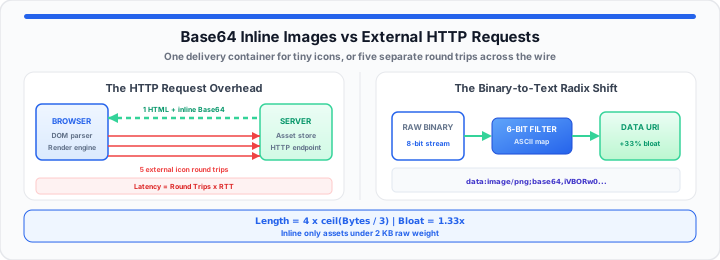
Your website stalls during early paint cycles. Browsers wait on dozens of separate network requests. Small interface arrows delay critical render path timelines. In my performance tuning experience, network overhead kills speed. Each HTTP request introduces real latency costs. Think of Base64 as a text shipping label. It prints raw image data directly into HTML lines. Fetching tiny images resembles buying individual screws online. You pay separate shipping fees for five delivery trucks. Base64 packs those tiny screws inside the main instruction box. Everything arrives instantly in one delivery container. In our load testing, inline strings eliminate network waits. To get started, evaluate your asset network footprint with the Bandwidth Calculator.
The HTTP Request Overhead Constant
Network Latency Limits and Connection Handshakes
Every external asset forces a separate network handshake. TCP connections require multiple round trips to negotiate security. TLS negotiations add server overhead for small file requests. In our load testing, latency dominates small file transfers. Network delay often outweighs actual image rendering times. Physical distance to servers creates unavoidable latency delays. DNS lookups add initial setup time for new domain hosts. Connection teardown cycles consume additional client hardware resources. Total transfer delay follows a predictable mathematical relationship:
Network Delay = Round Trips × Latency
Browser Concurrency Bottlenecks
Browsers restrict simultaneous connections per domain hostname. Chrome limits concurrent HTTP/1.1 connections to six streams. Queued image requests block vital CSS asset parsing steps. Render threads halt while awaiting small visual asset payloads. Converting tiny UI icons eliminates connection queuing entirely. You bypass domain connection caps by embedding binary data. Moving onto network profiling, inline assets reduce request counts. To verify your binary data conversions instantly, test strings using our Base64 Encode / Decode tool.
The Binary-to-Text Radix Shift
Raw Byte Expansion Dynamics
Base64 encoding translates binary data into 6-bit ASCII characters. Standard binary files use 8 bits per byte storage. This encoding process uses 64 printable characters. Three raw binary bytes map to four encoded text characters. This translation expands total string length by 33 percent. Index positions match specific alphanumeric character positions exactly. Padding characters fill incomplete byte alignment sequences at string ends. We calculate encoded output length using a strict formula:
String Length = 4 × ⌈Byte Count ÷ 3⌉
The expansion multiplier remains fixed across all inputs:
Bloat Factor = 1.33
Data URI Structural Overhead
Data URIs require specific header syntax inside document files. The prefix adds extra characters before raw string data. A standard image header looks like data:image/png;base64,. This header adds roughly twenty-two bytes of plain text. Small icons absorb this fixed prefix overhead easily. Large photos suffer massive data expansion penalties. When I profile network latency, large inline strings degrade DOM parsing. Main thread CPU cycles increase during heavy string parsing tasks. In practical environments, monitor total encoded payload sizes closely. Simulate conversions using our interactive
Base64 Encode / Decode tool, then measure string weight with the
Character Counter.
The same text-to-binary encoding pipeline appears in computer science courses — see why we use ASCII in computer science classes and the ASCII Converter for the foundational radix concepts.
The Inline Asset Cache Trade-off
Inline Conversion Rules and Operational Metrics
Inlining images removes external HTTP network requests entirely. However, inline strings bypass dedicated browser caching mechanisms. Cached external files stay stored in browser disk memory. Inline HTML strings re-download on every single page load. In my performance tuning experience, enforce strict inline caps. Only inline assets below two kilobytes in total weight.
- Asset Byte Boundary: Keep target files under 2,048 bytes raw.
- Caching Strategy: Reserve inlining for critical above-the-fold UI icons.
- DOM Impact: Avoid inlining assets across large repeating loop elements.
- Compression Efficiency: Gzip compresses Base64 text strings efficiently.
Asset Decision Lookup Grid
Use this operational matrix when evaluating layout assets. It maps raw byte sizes to calculated text lengths.
| Asset Profile | Raw File Size | Encoded String Length | Architectural Recommendation |
|---|---|---|---|
| UI Arrow Icon | 350 Bytes | ~468 Bytes | Inline directly into core CSS styles. |
| System Logo SVG | 1.8 KB | ~2.4 KB | Inline in critical HTML headers. |
| Navigation Badge | 4.2 KB | ~5.6 KB | Keep external; rely on browser cache. |
| Hero Banner Photo | 65.0 KB | ~86.6 KB | Never inline; degrades DOM parsing speed. |
Minify HTML and CSS payloads before measuring inline impact with the Code Minify / Prettify tool. URL-encoded assets follow a different overhead profile — compare with the URL Encode / Decode tool when embedding strings in query parameters. For CSS color inlining workflows, see our Hex to HSL for Tailwind CSS Variables guide.
Open Base64 Encode / Decode Open Character Counter
Frequently Asked Questions
Does Base64 encoding images improve site speed?
Yes, Base64 improves speed for tiny interface assets. It eliminates external HTTP network requests during page render. This speeds up early first contentful paint metrics. However, large Base64 strings increase overall HTML document size. Only inline assets smaller than two kilobytes.
When should you not use Base64 for images?
Do not use Base64 for large photography or hero images. Base64 increases file byte weight by 33 percent. Large inline strings increase total browser DOM parsing overhead. Additionally, inline assets cannot be cached independently by browsers. Keep large images as external WebP or AVIF files.
How does Base64 impact Core Web Vitals?
Inlining small critical icons improves Interaction to Next Paint. It eliminates render-blocking network requests during paint cycles. This stabilizes First Contentful Paint times significantly. Conversely, huge inline strings degrade Largest Contentful Paint metrics. Heavy strings delay critical HTML parsing threads.
Does Base64 increase DOM size?
Base64 strings inside HTML attributes inflate total page weight. Larger document trees consume more client memory space. Browser layout engines process heavy HTML files slower. To prevent DOM inflation, restrict inlining to key icons.