
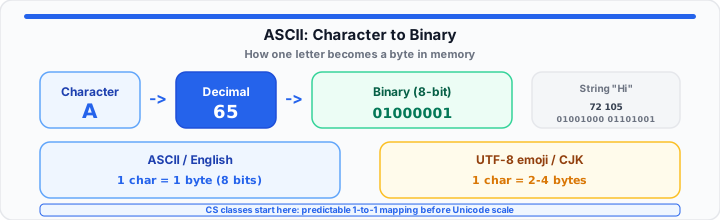
You type Hi in an editor and it looks obvious. Then your lab assignment dumps 01001000 01101001 on screen and your brain stalls. Computers do not store letters - they store numbers. ASCII is the shared numbered post-it wall that tells the CPU which byte pattern means which symbol.
In our lab grading, the students who click first are rarely the ones who memorized a 128-row chart. They are the ones who can trace one character through decimal and binary in under a minute. To get started without hand-converting every bit, paste any string into our on-page ASCII converter and read hex, decimal, and binary side by side.
What Is ASCII? (The Foundation)
ASCII - American Standard Code for Information Interchange - is an agreement from the 1960s that still shapes how bytes become text. The original table defines 128 characters using 7 bits: codes 0 through 31 for control functions (tab, newline, escape), and codes 32 through 127 for printable symbols including space, digits, punctuation, and uppercase/lowercase English letters.
Picture a wall of numbered slots. Slot 65 always holds capital A. Slot 72 holds H. Every compliant system reads the same slot the same way - that predictability is why instructors still reach for ASCII on day one of encoding units.
Modern storage usually pads each 7-bit code into an 8-bit byte (the high bit is zero for standard ASCII). One character, one byte - like packing a lunchbox where each item gets exactly one compartment. No variable-length surprises yet.
Why CS Classes Start with ASCII
Intro courses need a sandbox small enough to see the entire mapping on one poster. Unicode has over 100,000 characters across scripts and emoji. UTF-8 variable-length encoding is the right tool for production apps - and the wrong first homework if someone still struggles with powers of two.
ASCII teaches four ideas that show up everywhere later:
- Binary representation - text is just integers stored as bit patterns.
- Fixed-width thinking - string length equals byte count for basic English.
- Memory layout - arrays of bytes, indexable characters, off-by-one bugs you can actually see.
- Protocol literacy - logs, serial ports, and packet dumps still print hex byte streams.
What we notice when students debug strings: once ASCII clicks, pointer arithmetic and struct padding lectures hurt less. You already believe a char is a small integer wearing a costume.
How Text Looks to a CPU (The Math)
Take the string Hi. The CPU stores two bytes back to back in memory - not two abstract letters floating in a cloud.
H = 72 = 01001000
i = 105 = 01101001
Manual check on H: decimal 72 breaks into 64 + 8, so bits 6 and 3 flip on: 01001000. Lowercase i is 105 (64 + 32 + 8 + 1) → 01101001.
In a hex editor the same string might appear as 48 69 because 72 decimal is 0x48 and 105 is 0x69. Same bytes, three outfits: decimal for human math, hex for debugging, binary for hardware lectures.
Moving onto a quick sanity workflow before an exam: pick a character, look up decimal, convert to 8-bit binary, verify in the ASCII converter. Repeat until the pipeline feels boring - that is when it has stuck.
Common ASCII codes for lab work
| Character | Decimal | Hex | Binary |
|---|---|---|---|
| A | 65 | 41 | 01000001 |
| a | 97 | 61 | 01100001 |
| 0 (digit) | 48 | 30 | 00110000 |
| Space | 32 | 20 | 00100000 |
| Newline (LF) | 10 | 0A | 00001010 |
ASCII vs. Unicode (The Scale Issue)
Unicode assigns a code point to virtually every written symbol on Earth - including emoji. UTF-8 encodes those code points as one to four bytes. English letters in UTF-8 still match ASCII byte-for-byte, which is why plain JSON and HTML stay compact in Western locales.
One raw truth from production debugging: a string length in characters is not always equal to byte length once you leave ASCII. A single emoji can consume four bytes while looking like one glyph on screen. CS classes teach ASCII first so you understand the one-byte baseline before that scaling shock hits your first internationalization bug.
In practical environments, treat ASCII as the training wheels, UTF-8 as the highway. Network traces and C strings on embedded boards still speak ASCII-shaped bytes. Web APIs and modern apps layer UTF-8 on top. Knowing both prevents you from guessing when a serial log shows 48656C6C6F instead of Hello.
Decode that hex dump instantly with the ASCII converter. For transport encoding of binary blobs, continue to Base64 Encode / Decode. For bitwise practice on binary strings, open the Binary Calculator.
What This Looks Like in Your Terminal
A C program storing char msg[] = "Hi"; lays out bytes 72, 105, 0 - the final zero is NUL, ASCII code 0, marking the string end. Python 3 strings are Unicode objects internally, but when you encode to UTF-8 with "Hi".encode() you get the same two ASCII-compatible bytes back.
In my experience teaching beginners, the lightbulb moment is realizing keyboards emit bytes, monitors decode bytes, and your homework hex editor is just showing the middle layer without decoration. ASCII is the Rosetta Stone for that layer - small enough to memorize the patterns that matter, stable enough to still appear in real stack traces decades later.
Open ASCII Converter Open Binary Calculator
Common ASCII Questions from CS Students
Why do computer science classes teach ASCII?
ASCII maps one English character to one byte with a fixed 128-code table - ideal for learning binary, memory, and string indexing before multi-byte Unicode.
Is ASCII the same as Unicode?
No. Unicode is vastly larger. UTF-8 encodes Unicode and preserves ASCII bytes for English, but many characters need two to four bytes.
How many bits is an ASCII character?
Seven bits define the classic table; storage uses eight bits per byte with the high bit zero.
What is the ASCII code for the letter A?
Decimal 65, hex 41, binary 01000001.
Do programmers still use ASCII today?
Yes - in logs, headers, scripts, and embedded firmware. UTF-8 builds on ASCII; it does not replace the baseline logic.