
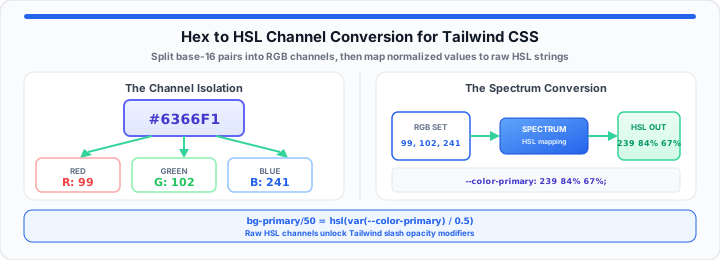
Hardcoded hex values break native Tailwind opacity utilities. The popular slash syntax fails with static base-16 color codes. In our layout testing, hardcoded hex values block dynamic styling. Utility classes like bg-brand/50 require variable alpha channels. A hardcoded hex string resembles a locked paint can. You see the color name on the sealed metal lid. Yet you cannot change the mixture inside the can easily.
Think of HSL as a developer-friendly dial system. Three open levers tweak tint, saturation, and lightness instantly. Hue sets the primary color tint across the spectrum. Saturation controls how rich or muddy the shade appears. Lightness adds pure white or pure black values effortlessly. Converting hex strings unlocks seamless CSS variable theme engines. You can verify your color space parameters instantly with the RGB to Hex Color Converter, which outputs matching hex, RGB, and HSL codes side by side.
The conversion lookup table below maps default Tailwind color values. Storing raw HSL channels enables native opacity modifiers in themes.
| Tailwind Color Name | Hex Code | Raw HSL Channels | CSS Variable Injection Blueprint |
|---|---|---|---|
| Primary Indigo | #6366F1 |
239 84% 67% |
--color-primary: 239 84% 67%; |
| Success Green | #22C55E |
142 71% 45% |
--color-success: 142 71% 45%; |
| Alert Crimson | #EF4444 |
0 84% 60% |
--color-alert: 0 84% 60%; |
| Warning Amber | #F59E0B |
38 92% 50% |
--color-warning: 38 92% 50%; |
| Neutral Slate | #64748B |
215 16% 47% |
--color-neutral: 215 16% 47%; |
The Base-16 Channel Breakout
Hexadecimal strings package red, green, and blue values into pairs. Base-16 notation uses digits zero through nine and letters A-F. The first character pair represents the red channel intensity. The middle pair defines the green channel light value. The final pair controls the blue channel output level. In my production layout experience, parsing hex pairs requires math. Converting base-16 characters yields standard integer ranges between 0-255. Dividing integer values by 255 creates normalized decimal fractions. Normalized channels allow precise color space transposition calculations. To get started, isolate individual two-character hexadecimal strings cleanly. You should simulate your color adjustments with our interactive hex-to-hsl converter now.
The same base-16 pair logic appears when network engineers parse IPv4 octets into hex dumps — see our guide on how network engineers parse raw IPv4 addresses to hex formats, or run values through the IP Address Converter.
Decimal Channel Normalization
Divide each isolated RGB integer by two hundred fifty-five. This operation converts whole numbers into normalized decimal values. Normalized decimals range strictly between zero and one inclusive. Decimal normalization simplifies complex 360-degree color wheel conversions. Floating-point decimals maintain precise color accuracy across conversions. Normalized channel values eliminate rounding errors during intermediate math. Standardized decimal channels feed directly into color space algorithms.
Alpha Channel Extensions
Eight-digit hex codes include two additional trailing alpha characters. Base-16 alpha values map directly to opacity percentage floats. Converting alpha hex pairs establishes transparent background layers easily. Parsed alpha decimals feed directly into modern color functions. An alpha value of FF represents one hundred percent opacity. An alpha value of 00 represents complete element transparency. Mid-range alpha values generate smooth glassmorphism UI background layers.
Bitwise Parsing Performance
Bitwise shift operators process hex strings faster than regex matches. Bitwise operations extract channel integers in sub-millisecond execution windows. High-performance design systems leverage bitwise parsing inside build scripts. Fast color parsing optimizes real-time client-side theme switching. Shift right operators isolate specific sixteen-bit binary string segments. Bitwise AND masks clear surrounding unwanted binary flag bits. Optimized bitwise routines process thousands of color tokens instantly — the same class of low-level parsing taught in why we use ASCII in computer science classes and the ASCII Converter.
The Chromatic Wheel Transposition
Cylindrical color spaces arrange visible light along a circular spectrum. Converting normalized RGB values requires finding channel extremes first. Identify the maximum and minimum channel values among RGB floats. Delta measures the absolute difference between maximum and minimum bounds. Maximum bounds dictate total lightness calculations across the spectrum. When maximum and minimum values match, saturation equals zero percent. Zero saturation creates neutral gray shades without active chromatic hues.
L = (Max + Min) ÷ 2
S = (Max − Min) ÷ (1 − |Max + Min − 1|)
H = Hue Calculation Angle
Moving onto hue angles, channel dominance dictates wheel positions. Red dominance places hue calculations near zero or 360 degrees. Green dominance shifts hue angles around 120 spectrum degrees. Blue dominance centers hue angles near 240 spectrum degrees. In practical environments, HSL values streamline runtime theme adjustments. You can map out your color spectrum values using this free CSS tool now.
Luminance Calculation Boundaries
Lightness represents the average between peak and trough light channels. Values near zero produce dark charcoal or black shades. Values near one hundred percent yield bright white tones. Mid-range lightness values preserve rich original color tones. Luminance controls overall visual contrast across different UI themes. Balanced lightness ratios maintain accessibility compliance across components. Calculating exact luminance values prevents unreadable text contrast failures.
Saturation Intensity Scale
Saturation measures chromatic purity relative to neutral white or gray. High saturation levels deliver vivid, high-contrast visual user elements. Low saturation levels produce soft, muted background surface fills. Adjusting saturation levers creates cohesive dark mode color palettes. Pure spectral colors display one hundred percent saturation levels. Muted slate grays carry low saturation percentage values. Desaturating background elements improves text readability across dashboards.
Hue Spectrum Mapping
Hue calculations map channel balances onto a three-hundred-sixty-degree circle. Dividing channel deltas determines precise hue sector coordinates. Multiplying sector fractions by sixty yields final hue angle values. Angle outputs wrap around cleanly to form continuous spectrums. Modulus operators keep negative hue angles within positive boundaries. Calculated hue angles identify primary color family relationships accurately. Precise hue angles allow automated complementary color palette generation.
The Production Theme Layer Injection
Integrating raw HSL values into Tailwind CSS requires systematic setup. Store raw numeric channels inside root CSS custom property slots. Omit the degree symbols and percentage signs inside CSS variables. Separating raw numbers enables Tailwind to inject dynamic alpha layers. In my production layout experience, raw channel storage works best. Tailwind applies slash syntax by appending opacity variables smoothly. You can test your custom balance variables right now.
- Raw Custom Property Slot:
--color-primary: 217 91% 60%; - Tailwind Config Utility Function:
hsl(var(--color-primary) / <alpha-value>) - Active Tailwind Class Name:
bg-primary/50 - Calculated CSS Output:
background-color: hsl(217 91% 60% / 0.5); - Dynamic Theme Override:
--color-primary: 217 91% 40%; - Supported Utility Variants:
text-primary,border-primary,ring-primary
Tailwind Config Script Architecture
Extend theme color objects inside your Tailwind configuration file. Reference CSS custom properties using functional opacity callback definitions. Functional callbacks inject Tailwind alpha placeholders into raw HSL variables. This architecture supports every utility class without manual duplication. Custom theme extensions preserve core Tailwind default utility classes. Configured HSL variables generate hover and focus state modifiers. Centralized color definitions accelerate site-wide rebranding initiatives significantly.
Dynamic Dark Mode Switching
Swap raw CSS variable values inside dark theme class scopes. Dark mode overrides recalculate surfaces without altering utility markup. Components adapt instantly when root variable strings update at runtime. Clean variable swaps reduce total compiled CSS bundle file sizes. CSS custom properties eliminate duplicated stylesheet rule generation completely. Runtime theme swaps execute without triggering browser page reloads. System preferences trigger automatic dark mode theme switching smoothly.
Modern CSS Color Module Level 4
CSS Color Module Level 4 simplifies modern HSL syntax formatting. Space-separated values replace older comma-separated functional notation parameters. Forward slashes separate optional alpha channel values from lightness percentages. Modern syntax aligns perfectly with Tailwind dynamic opacity utility engines. Browser rendering engines process modern functional syntax variants rapidly. Cleaner syntax reduces inline style block character counts overall. Standardized syntax improves design system code maintainability for teams. When hex bytes drift during data import pipelines, see our guide on how to sanitize and recover corrupted characters from broken CSV data files.
Open RGB to Hex Converter Open ASCII Converter
Frequently Asked Questions
Why is HSL better than HEX for Tailwind CSS themes?
HSL separates color hue from saturation and lightness channels cleanly. Separated channels allow Tailwind to inject dynamic alpha opacity layers. Hex codes lock channels together, preventing flexible opacity modifier controls. HSL variables enable instant runtime palette adjustments across components.
How do you add custom opacity levels to CSS variables?
Store raw numeric HSL channels without functional CSS wrappers first. Wrap variables inside HSL functions containing alpha slash parameters. Tailwind replaces alpha placeholders with desired opacity values at runtime. This pattern enables arbitrary opacity modifiers like bg-brand/30.
Does converting Hex to HSL impact browser rendering performance?
Converting colors at build time causes zero browser performance overhead. CSS engines evaluate HSL functions rapidly during style recalculation passes. Raw variable values parse efficiently across all modern browser engines. Pre-computed HSL variables optimize runtime stylesheet execution speeds.
Can I use space-separated HSL values in legacy browsers?
All modern browsers support modern space-separated HSL functional syntax. Legacy browsers require fallback declarations or CSS build post-processing tools. Autoprefixer utilities convert space-separated syntax for older web browsers. Fallback declarations protect layout compatibility on outdated client devices.