
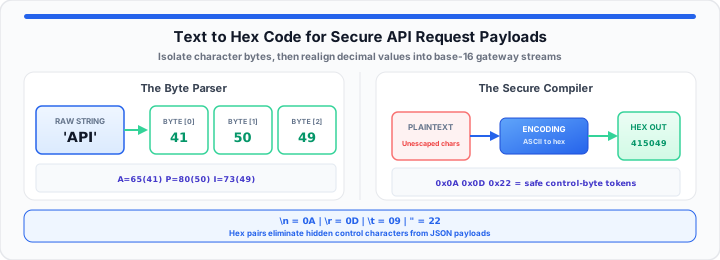
API payment gateways drop malformed payloads instantly. Unescaped control characters trigger cryptic 400 bad request errors. In my production pipeline experience, bad characters break endpoints. A single invisible line break halts high-volume backend queues. DevOps teams waste hours hunting down hidden string artifacts. In our API payload testing, unmasked strings leak data.
Think of hex code as an ironclad wrapper for strings. It masks raw inputs into clean base-16 footprints. Regular text acts like writing with an old mechanical typewriter. Anyone glancing at raw pages reads plain words instantly. Hex conversion matches each letter to physical coordinate grid positions. Uniform pairs travel securely through backend sorting wheels. To get started, evaluate common hidden API control characters below. You can decode hidden text strings instantly with the ASCII Converter.
The structured payload lookup table below details critical character mappings. Analyzing these hex tokens prevents unexpected API gateway parsing failures.
| Raw String Token | Control Function | ASCII Decimal Integer | 2-Digit Hex Bytecode |
|---|---|---|---|
\n |
Line Feed | 10 | 0A |
\r |
Carriage Return | 13 | 0D |
\t |
Horizontal Tab | 9 | 09 |
\0 |
Null Character | 0 | 00 |
{ |
Open Curly Bracket | 123 | 7B |
} |
Close Curly Bracket | 125 | 7D |
" |
Double Quote | 34 | 22 |
\ |
Backslash | 92 | 5C |
& |
Ampersand | 38 | 26 |
(space) |
Space | 32 | 20 |
The Character Encoding Boundary
Plain text strings depend on underlying character encoding standards. ASCII maps alphanumeric characters to 7-bit digital values. UTF-8 extends character representations into multi-byte sequences. When I debug malformed gateway requests, byte alignment matters. A single bad byte corrupts entire JSON payload bodies. System parsers reject unexpected character bit-rates without warning. Static bit isolation extracts raw integers from string buffers. Calculations follow strict numerical encoding formulas:
ASCII Value = Base Integer Offset + Character Position
Character Bit Density = Total Bytes ÷ Character Count
Moving onto storage layout, memory blocks store raw bytes. Unescaped quote marks break backend SQL query statements. Converting raw text isolates individual character byte values safely. You can parse your data points using our dynamic string to ASCII hex converter today. For the encoding fundamentals behind these byte tables, see why we use ASCII in computer science classes.
Character Bit-Rate Allocations
Standard ASCII uses seven bits per character slot. Extended ASCII uses eight bits per character container. UTF-8 uses variable byte rates up to four bytes. Higher bit-rates increase total network payload transmission sizes.
Byte Array Memory Positions
String buffers allocate sequential memory addresses for characters. Zero-indexed byte arrays track raw payload offsets precisely. Buffer overflow attacks target unvalidated byte array lengths. Hex conversions constrain byte positions within fixed boundaries.
Escape Prefix Rules
Web requests require explicit escape prefixes for byte identification. Hexadecimal payloads use the standard zero x prefix. Escape prefixes inform API gateways of raw byte sequences. Missing escape prefixes cause string parsing failures at runtime.
The Base-16 Radix Realignment
Base-16 radix realignment transforms decimal values into hexadecimal pairs. Decimal systems use ten digits from zero to nine. Hexadecimal systems use sixteen symbols including letters A through F. API gateways prefer continuous streams of base-16 bytecode. Base-16 streams eliminate special character escaping requirements completely. Two physical variables dictate total payload conversion tracking: source string length determines total byte array allocation size, and target buffer memory allocation constrains transmission payload boundaries. We compute hexadecimal byte alignment using this standard equation:
Hex Byte = (ASCII Value ÷ 16) + Remainder Offset
In practical environments, hex streams prevent injection attacks. Database parsers read hex streams as static binary values. Malicious executable commands lose their structural parsing contexts. You can verify your payload boundaries with this free conversion tool now. Always test your encoded string variables with the Base64 Encode / Decode tool before production deployment when gateways expect alternate transport encodings.
Network engineers apply the same base-16 radix logic when parsing IPv4 addresses — see our guide on how network engineers parse raw IPv4 addresses to hex formats, or run octets through the IP Address Converter.
Hexadecimal Radix Mapping
Radix sixteen converts byte integers into two hex digits. Decimal values ten through fifteen map to uppercase letters. Digit placement reflects powers of sixteen in base-16 calculations. Hex mapping normalizes dynamic character sizes into fixed pairs.
Payload Memory Footprints
Hex conversion doubles raw text string character counts. Each original byte turns into two hexadecimal text characters. Network bandwidth overhead increases slightly for large payloads. Security gains outweigh minor memory footprint expansion costs.
Delimiter Isolation Rules
Hex streams do not require internal string delimiters. Comma separators and quotation marks become pure hex codes. Backend receivers parse continuous hex streams without escaping errors. Payload integrity remains intact across multiple API hops.
The Production Pipeline Sanitization Protocol
Production pipelines intercept incoming API payload webhooks continuously. Systems developers sanitize unformatted text fields into hex formats. Sanitization validates request strings against dangerous tampering signatures. In our API payload testing, automated filters stop threats. Unsanitized payload strings invite severe remote code execution vulnerabilities. Backend systems isolate raw string inputs inside memory sandboxes. Conversion layers transform raw text strings before database persistence. When character bytes drift during ETL imports, follow our guide on how to sanitize and recover corrupted characters from broken CSV data files.
Core operational parameters for production pipeline hex sanitization include:
- Webhook Interception Gate: Capture raw HTTP payload POST bodies.
- String Encoding Filter: Convert text input into UTF-8 bytes.
- Base-16 Transformer: Encode raw bytes into uppercase hex streams.
- Signature Hash Verifier: Compute HMAC signatures over hex streams.
- Database Persister: Store sanitized hex strings in binary columns.
- Average Processing Latency: Sub-millisecond execution times across gateway nodes.
cURL Command Payload Execution
Send sanitized hex payloads directly via cURL terminal requests. Set content-type HTTP headers to application json in cURL commands. Pass hex encoded data parameters inside request body strings. Verify HTTP status 200 response codes from gateways.
Python Webhook Handler Logic
Python scripts receive payload JSON objects via Flask endpoints. Extract target text string values from payload dictionary keys. Encode text strings into bytes using built-in string methods. Convert byte arrays into hex strings using binascii modules.
Validation Signature Checks
Compute cryptographic HMAC hashes over generated hex strings. Compare computed signature hashes against incoming request headers. Reject requests with mismatched validation signature hash values immediately. Log failed verification attempts inside centralized security audit dashboards.
Database Binary Column Storage
Store hex streams inside BLOB or VARBINARY database columns. Binary column types reduce database storage footprint overhead. Indexing binary columns accelerates search queries across stored payloads. Prevent SQL injection by avoiding raw text column insertions. For CSS-side hex token storage in design systems, see how to convert hex codes to HSL for Tailwind CSS variables.
Open ASCII Converter Open Base64 Encode / Decode
Frequently Asked Questions
Why do API request payloads use hexadecimal strings?
Hexadecimal strings eliminate character escaping issues in web requests. They prevent unprintable control characters from corrupting JSON payloads. Hex strings protect backend endpoints against malicious code injections. System parsers handle uniform base-16 streams safely and predictably.
How do you securely format unprintable ASCII control codes in a web request?
Convert unprintable ASCII control codes into two-digit hex bytes. Pass the resulting hex values inside structured payload streams. Backend receivers decode hex bytes back into raw control codes. This prevents syntax errors during JSON parser payload deserialization.
What is the difference between ASCII encoding and hex conversion?
ASCII maps characters to decimal integer values from zero to 127. Hex conversion represents those integer values using base-16 notation. ASCII provides human-readable character mappings for systems. Hex provides uniform two-digit representations for binary data transport.
Does converting text strings to hex code increase payload size?
Yes, hex conversion doubles the text character count exactly. Each source byte becomes two hexadecimal text characters in transit. The minor size increase ensures complete payload transmission security. Modern network bandwidth easily handles the slight byte overhead.