
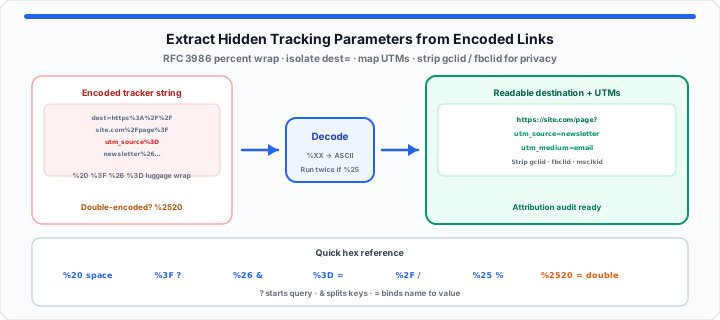
Staring at a 400-character wall of text inside a campaign performance report only to realize half the link is choked with %20, %3F, %26, and %3D is a daily frustration for web analysts. In my experience breaking down inbound traffic across complex ad networks, unreadable URLs make click auditing, affiliate attribution, and privacy checks vastly more difficult than they need to be.
When a browser encounters special characters, spaces, or nested query strings within a link, it converts those raw symbols into strict alphanumeric codes. Think of percent-encoding as industrial luggage wrap used at airport terminals. It encases fragile or awkward items—like spaces, punctuation, or second-layer redirect links—in a tough, uniform plastic layer so they do not get snagged or torn apart while traveling across intermediate web servers. However, once that URL reaches its final destination, you must peel back the plastic wrapping to see the actual parameters hiding underneath.
Instant decode: Paste garbled strings into our URL Encode / Decode tool—processing stays in your browser. When payloads also embed URL fragments inside JSON webhooks, validate structure with Code Minify & Prettify after you decode nested values.
The Mechanics of Percent Encoding
Web browsers communicate using the standard URI specification defined under RFC 3986. Under this technical standard, characters are split into two distinct categories: unreserved characters (letters, numbers, hyphens, underscores, periods, and tildes) and reserved characters (symbols like ?, =, &, /, and #).
When a user submits a search box query containing spaces, or when an email platform injects a nested destination link inside a redirect parameter, the application must neutralize those reserved symbols. If a browser left a raw space inside a web link, the web server would assume the HTTP request header ended right at the blank space, breaking the connection instantly.
To prevent transmission errors, browsers execute a systematic swap: they take the unsafe character, look up its hexadecimal value on the ASCII table, and prepend a percent sign. The conversion is expressed as Decoded Symbol = ASCII Hex Conversion(%XX).
For instance, a plain space character carries an ASCII hexadecimal value of 20, turning it into %20. A question mark carries a hex value of 3F, becoming %3F. While this conversion keeps internet infrastructure running smoothly, it turns simple marketing parameters into unreadable gibberish for human reviewers. For byte-level ASCII references during deep audits, pair this workflow with the ASCII Converter or our text-to-hex API payload guide.
Step-by-Step: How to Read and Parse Hidden Tracking Data
To get started dismantling a complex URL string manually, follow this five-step analytical workflow to locate referral tokens and campaign data.
- Locate the query string separator: Find the initial question mark (? or %3F) that separates the core web page path from the incoming data payload.
- Isolate individual parameter pairs: Look for ampersands (& or %26) that divide distinct tracking keys from one another.
- Identify key-value assignments: Locate the equals sign (= or %3D) inside each parameter segment. The text on the left is the metric name; the text on the right is the recorded value.
- Convert percent-encoded hex tokens: Scan the right-hand value strings for any three-character block starting with %. Replace those tokens with their readable ASCII equivalents using a standard conversion reference.
- Map key variables to analytics attributes: Group your clean key-value outputs into recognized marketing categories, such as traffic sources, campaign names, or user ID flags.
The Quick Reference Bench Sheet: Common Percent Codes
Moving onto character identification, use this direct reference lookup table to translate hex codes back into standard typography when inspecting web traffic logs:
| Percent Hex Code | Raw ASCII Symbol | Character Name / URL Function | Conversion Meaning |
|---|---|---|---|
| %20 | (Space) | Word Separator | Replaces blank spaces inside query terms |
| %21 | ! | Exclamation Mark | Used in custom parameter identifiers |
| %23 | # | Hash / Fragment Anchor | Points to specific section IDs on a page |
| %24 | $ | Dollar Sign | Used inside monetary value tracking parameters |
| %25 | % | Percent Symbol | Literal percent sign inside a parameter string |
| %26 | & | Ampersand Parameter Joiner | Connects multiple variables together |
| %2F | / | Forward Slash | Separates directory folders and paths |
| %3A | : | Colon | Precedes port numbers or protocol definitions |
| %3B | ; | Semicolon | Used as sub-component delimiters in legacy code |
| %3D | = | Equals Key-Value Assignor | Binds a parameter name to its measured value |
| %3F | ? | Query String Initiator | Marks the beginning of tracking parameters |
Practical Marketing Workflows: Stripping UTM Chains for Privacy or Redirection
In practical environments, handling encoded URLs is a daily requirement for campaign auditing, affiliate link validation, and customer privacy protection.
When running multi-channel marketing campaigns across paid search, social ads, and email sequences, tracking parameters—known natively as Urchin Tracking Module (UTM) variables—are attached to destination pages. Standard parameters include utm_source, utm_medium, utm_campaign, utm_content, and utm_term.
However, when links pass through intermediate click trackers or affiliate networks, those UTM strings are often encoded inside a secondary parameter like redirect_url= or dest=. If the secondary URL is not converted back to plain text, your attribution platform might attribute conversion events to “direct traffic” rather than crediting the actual paid ad channel.
For example, when I am auditing live analytics data or checking incoming affiliate links, I often find double-encoded chains where a link looks like this:
https://tracker.com/click?dest=https%3A%2F%2Fsite.com%2Fpage%3Futm_source%3Dnewsletter%26utm_medium%3Demail
To extract the true destination, you must peel off the primary tracker path, isolate the dest parameter, and convert every hex string back to standard slashes, question marks, and ampersands. If you still see %25 sequences after one pass, run decode again—that is the hallmark of double-encoding.
When evaluating user privacy, stripping away invasive ad click identifiers—such as gclid (Google Click Identifier), fbclid (Meta Click Identifier), or msclkid (Microsoft Click Identifier)—allows privacy-focused web browsers to load clean pages without leaving cross-site behavioral footprints. Binary-safe payloads that are not URL parameters belong in Base64 Encode / Decode, not percent-encoding workflows. For invisible byte artifacts that survive copy-paste from logs, see our hidden character encoding guide.
Instead of manually editing hundreds of percent-encoded characters by hand or guessing your UTM sources in a text editor, you can paste your garbled string directly into our interactive URL Encode / Decode tool to convert the text back to plain English instantly.
Frequently Asked Questions
- Why do URLs use percent-encoding instead of regular plain text characters?
- Web infrastructure relies on the URI standard (RFC 3986), which mandates that only specific ASCII characters can travel safely across internet routers without being misinterpreted as system commands. Unsafe characters—like spaces, quotation marks, and non-English alphabets—are converted into percent-encoded hexadecimal blocks so servers process the full string reliably.
- What is the difference between a URL parameter and a percent code?
- A URL parameter is a structured key-value pair appended to an address to pass data into a web server (e.g., source=google). A percent code is a three-character hexadecimal sequence (e.g., %20 or %3D) used within those parameters to represent reserved or non-printable symbols safely without breaking the overall link structure.
- How can you quickly tell if a link contains malicious hidden parameters or safe tracking codes?
- Decoded tracking parameters generally reveal clear, readable analytics terms like utm_source=facebook or ref=newsletter. If decoding an encoded string reveals secondary file extensions (such as .exe or .sh), suspicious script commands, or unexpected external domains hidden inside a redirect= value, the link may be attempting a phishing or open-redirect attack.
- What happens when a web address is double-encoded?
- Double-encoding occurs when an already percent-encoded string passes through a second application that runs an encoding algorithm a second time. This converts existing percent symbols (%) into %25. For example, a space character (%20) becomes %2520. Resolving a double-encoded string requires running a decoding pass twice to recover the original plain text.