
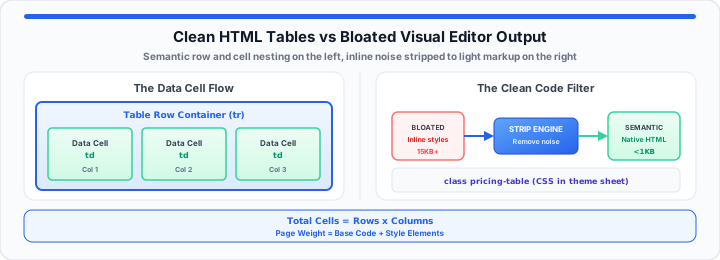
Visual page builders break website speed scores. In my production layout experience, plugins ruin performance. Content editors install heavy visual plugins daily. They just need a three-column pricing sheet. Instead, plugins insert hundreds of bloated tags. Messy visual editor code destroys mobile rendering speeds. It wraps simple text inside useless div layers.
Clean HTML code arranges data into matching rows. Messy visual code acts like bad physical packaging. It wraps a fork in three cardboard boxes. It adds heavy layers of bubble wrap inside. It binds the package with plastic tape. Then it places the single fork on a shelf. Your database stores all that useless code weight. Visual editors bloat database storage records. Every extra tag adds unnecessary byte weight. Browsers parse every useless tag during page loads. Heavy page loads hurt search engine crawling budgets. Clean markup keeps your site fast and responsive.
Think of your code table as a simple grid map. It is a strict matrix built to frame items safely. In our page speed audits, clean code wins every time. To get started, evaluate your current table code choices. You can verify your inline data parameters instantly with the HTML Table Generator.
The structural comparison grid below evaluates table creation methods. Analyzing these operational metrics helps teams prevent site slowdowns.
| Table Creation Method | Code Weight Impact | Mobile Responsiveness | System Update Crash Risk |
|---|---|---|---|
| Visual Page Builders | Extremely Heavy (15KB+) | Frequently Breaks | High (Plugin Conflicts) |
| Third-Party Extensions | Heavy (8KB - 12KB) | Mixed Results | Medium (Dependency Issues) |
| Native Semantic HTML | Ultra Light (< 1KB) | Fully Customizable | Zero (Standard Web Spec) |
The Semantic Layout Foundation
Clean tables rely on basic structural markup tags. The table container defines your outer grid boundary. Row elements group individual data cells horizontally. Header tags establish key metric labels clearly. Standard cell tags store your raw data values. Database engines store clean semantic code efficiently. Extra wrapper divs waste precious database memory space. When I fix broken client templates, I remove extra markup. Clean markup improves browser parsing speed dramatically. We calculate total grid cells using a basic formula:
Total Cells = Rows × Columns
Moving onto structural rules, semantic order matters greatly. Always place header rows inside the head block. Place standard data rows inside the body block. This structure helps screen readers parse content correctly. Search engines index clean semantic grids much faster. You can simulate your layout blocks with our clean HTML table generator right now.
Core Semantic Node Nesting
Never place raw text directly inside row containers. Data belongs strictly inside cell tags. Headers must align with matching data columns. Proper nesting prevents layout rendering glitches. Clean DOM structures render faster on mobile screens.
Header Scope Mapping
Assign scope attributes to every header cell. Use column scope for top metric labels. Use row scope for side data labels. Scope attributes boost accessibility compliance scores. Screen readers navigate mapped headers effortlessly.
Semantic Table Headings
Use table header tags for top header rows. Table header tags establish vertical column data meanings. Visual styling should not dictate semantic tag choices. CSS handles visual weight while HTML defines meaning. Correct tag choices strengthen document outline hierarchy. Pair semantic headers with brand colors from the RGB to Hex Color Converter when styling pricing tiers.
Table Caption Placement
Include a caption tag inside your table layout. Captions describe table data for search engines. Place captions immediately after the main table tag. Captions improve content context for index crawlers.
The Inline Attribute Multiplier
Visual editors insert inline styles into every cell. They add font sizes and colors repeatedly. This repetition causes severe code bloat across rows. A ten-row table multiplies bad inline attributes exponentially. In my production layout experience, inline styles break themes. Site redesigns fail when tables contain inline styles. Centralized CSS classes solve code duplication cleanly. Classes control table designs from one central stylesheet. We measure total page bloat using this equation:
Page Weight = Base Code + Style Elements
In practical environments, remove hardcoded inline styles immediately. External stylesheets handle padding, borders, and background colors. This separation keeps your HTML code light and clear. Lighter markup loads faster on weak mobile networks. You can map out your layout code metrics using this free grid tool with the Code Minify & Prettify formatter. Also, test your code block options with the Character Counter to measure byte savings after stripping inline noise.
Attribute Inflation Multipliers
Adding inline styles to fifty cells inflates file size. Five hundred extra style attributes add massive byte weight. Removing inline styles reduces HTML file size dramatically. Lighter files download quickly over cellular networks.
Centralized Class Architecture
Assign a single class to your main table tag. Style sub-elements using clean CSS child selectors. Child selectors format every row without cluttering HTML markup. Updating design themes requires editing just one stylesheet rule. The same separation principle applies when inlining tiny assets — see our guide on converting images to Base64 for load time for when inline strings help versus hurt page weight.
Design Maintenance Trade-Offs
Editing inline cell styles individually wastes valuable developer time. A fifty-row table contains hundreds of individual cell tags. Updating inline colors across fifty rows requires manual labor. Central CSS rules update every table cell instantly. Design systems stay consistent across all published pages. Theme color tokens stored as HSL variables — covered in our Hex to HSL for Tailwind CSS variables guide — keep table borders and header fills easy to swap at runtime.
Mobile Viewport Considerations
Unresponsive tables break mobile viewport borders instantly. Horizontal scrolling containers protect overall mobile page layouts. Clean CSS rules control container scroll behaviors smoothly. Mobile visitors read financial comparison tables without frustration.
The Production CMS Injection Protocol
Modern CMS platforms handle raw HTML blocks efficiently. WordPress block editors include native custom HTML blocks. Shopify page templates accept clean HTML code sections. Bypassing visual table plugins prevents system update crashes. In our page speed audits, native blocks outperform plugins. Native code blocks require zero external script downloads. They execute instantly without triggering database query delays.
- WordPress Custom Block: Insert raw code into custom HTML.
- Shopify Liquid Section: Paste semantic grids into HTML blocks.
- External CSS Handler: Store styles inside global theme stylesheets.
- Mobile View Rule: Set container widths to one hundred percent.
- Plugin Requirement: Zero third-party extensions installed or loaded.
- Average Code Savings: Eighty percent reduction in raw bytes.
WordPress Custom HTML Blocks
Open your Gutenberg block editor screen. Add a custom HTML block to your post layout. Paste your clean semantic table code directly inside. Save your post changes without touching visual table plugins. Your layout renders perfectly without unnecessary script overhead.
Shopify Liquid Template Injection
Navigate to your Shopify page customization panel. Insert a custom liquid or HTML content block. Add clean table markup with external class names. Save template changes to publish your clean grid. Products load faster when tables omit visual block bloat.
Theme Stylesheet Integration
Add layout classes to your global theme CSS file. Define border styles, text alignments, and background fills. Theme integration guarantees consistent table designs site-wide. Global styles update every table automatically across your site. Prettify exported markup with the Code Minify & Prettify tool before pasting into version control.
Content Workflow Efficiency
Copywriters generate clean HTML table code using external tools. They paste pristine markup straight into native CMS blocks. Developers maintain site styling rules inside main stylesheets. This clear separation speeds up overall publishing workflows. Teams launch new landing pages without plugin overhead. Deduplicate repeated row labels with the Duplicate Line Remover when migrating legacy spreadsheet exports.
Open HTML Table Generator Open Code Minify & Prettify
Frequently Asked Questions
How do I create an HTML table without using plugins?
Use a custom HTML block inside your CMS editor. Paste raw semantic table markup directly into the block. Control design styling using your global theme CSS file. This native method eliminates third-party plugin bloat entirely.
How do you make an HTML table responsive on mobile devices?
Wrap your table tag inside a container div element. Apply horizontal scroll CSS properties to the outer wrapper. Set the container width property to one hundred percent. Users scroll wide table columns smoothly on mobile screens.
Why do visual page builder tables slow down websites?
Visual page builders wrap every cell inside extra elements. They inject heavy inline style attributes into individual tags. This extra code increases total document file sizes significantly. Larger file sizes delay browser page rendering times.
Can clean HTML tables improve technical SEO rankings?
Clean semantic code helps search engine crawlers index content faster. Proper header mapping improves accessibility and crawler readability scores. Lighter code reduces page load times across mobile devices. Faster load times boost overall Google page experience metrics.