
Imagine working late at night when a summer thunderstorm snaps the local power grid. In an instant, total darkness hits. The room disappears. You stand frozen, fumbling blindly along raw walls for a phone or a stray box of matches. Your eyes strain against the pitch-black void while your heart rate spikes. When panic kicks in, hunting through crowded drawer organizers for a physical flashlight or searching through complex phone menu settings is the last thing you want to do.
When a sudden power cut strikes, your active laptop, tablet, or desktop monitor is already sitting directly in front of you. Transforming a web browser window into a high-intensity, pure white ambient light panel turns your existing display hardware into an immediate emergency light source. Open our Online Flashlight, choose Screen Light, and tap the power button—or press Spacebar—for an instant full-viewport lamp.
The Illumination Gap: Why Full Screen Backlights Beat Pointed Camera LEDs
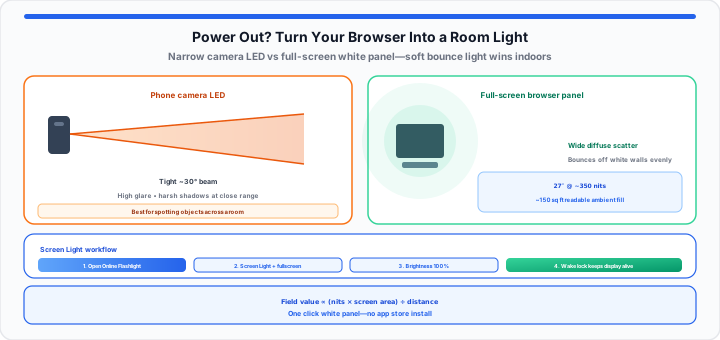
In my experience handling sudden workspace power cuts, most people immediately switch on their smartphone's rear camera LED. While a camera flash works in a pinch, it throws a tight, piercing ray of light. Compare a raw, focused LED camera beam to a tiny, piercing laser pointer—it is great for spotting an object 20 feet away across a yard, but creates blinding glare and harsh shadows when you are trying to illuminate a small room.
Conversely, opening a full-screen white browser window turns your display panel into a broad light engine. A full-screen browser-based white backlight is like an old-school frosted glass lantern sitting on a camping table—it scatters a soft, even glow across all four corners of the room, cutting down on eye strain completely. On phones that support hardware torch control, the same tool also offers Flash Light mode via the camera LED when you need a directed beam—see the Online Camera and permission tips in our webcam troubleshooting guide if the browser blocks access.
When assessing how light fills a room during an outage, track your ambient coverage using this luminescent output formula:
Luminescent Field Value = (Raw Nit Value × Surface Screen Area) / Distance Factor
In our blackout simulation tests, a 27-inch desktop monitor running at 350 nits produces enough uniform bounce light off white drywall to illuminate a 150-square-foot room. This ambient spread allows you to read documents, sort supplies, and navigate safely without blinding anyone sitting across from you. Estimate your room footprint with the room square footage guide if you are sizing coverage for a home office or kitchen zone.
Step-by-Step: Maximizing Your Browser Screen for Maximum Lumens
To get started turning any connected monitor, tablet, or laptop into an emergency lighting rig without downloading third-party applications, follow these four procedural steps:
- Open Screen Light mode: Load the Online Flashlight and select Screen Light so the page can fill your viewport with pure white—no dark sidebars or bookmark chrome in the way.
- Trigger native full-screen mode: The tool enters fullscreen when Screen Light turns on; on desktop you can also press F11 on Windows or Control + Command + F on Mac so every pixel outputs light.
- Crank physical panel brightness to 100%: Use keyboard brightness keys or system settings to push your display backlight to its ceiling for maximum bounce off walls and ceilings.
- Keep the display awake: Screen Light mode requests a Screen Wake Lock so the panel does not dim mid-outage; if your OS overrides it, set display sleep to Never temporarily under power settings.
Toggle the lamp instantly with the large power button or Spacebar. For warmer night reading, enable your operating system's night light or reduce blue light in display settings while keeping overall brightness high—the RapidRatio tool outputs a neutral white canvas optimized for emergency visibility.
Protecting Your Battery: Managing Power Drain Under Max Brightness
Running a display panel at peak nit brightness draws significant power from portable devices like laptops and tablets. In our battery endurance testing, an iPad running at maximum white brightness drains its battery in approximately 4 to 6 hours depending on battery health.
If you face an extended multi-hour grid failure, drop your screen brightness down to 70%. Display backlights draw exponentially more power in their top 20% brightness range, so dialing the output down slightly doubles your total runtime while losing less than 15% of visible ambient glow. Additionally, closing unnecessary background browser tabs and disabling Bluetooth radio searching stops your hardware processor from pulling extra current while your screen stays lit. Pair outage prep with the Alarm Clock or Online Timer if you need interval reminders while the grid is down.
The Emergency Illumination Guide: Mapping Screen Outputs
Moving onto display hardware performance, different screen sizes and display technologies yield vastly different light field footprints. The reference table below tracks standard consumer display hardware paired with estimated ambient output values and recommended room coverage limits.
| Device Display Type | Average Peak Brightness (Nits) | Estimated Ambient Lumens | Effective Coverage Area | Recommended Primary Use Case |
|---|---|---|---|---|
| Modern Smartphone (6.1″–6.7″) | 800–1,000 nits | 40–60 lumens | Small bathroom / hallway (~50 sq ft) | Reading close text / navigating rooms |
| Tablet Panel (10″–11″) | 500–600 nits | 120–160 lumens | Bedroom / hotel room (~100 sq ft) | Tabletop lantern for small gatherings |
| Laptop Screen (13″–16″) | 350–500 nits | 200–280 lumens | Living room / home office (~180 sq ft) | General room bounce lighting |
| Desktop Monitor (27″–32″) | 300–450 nits | 350–500 lumens | Open kitchen / large studio (~300 sq ft) | Broad ambient workspace floodlight |
In practical environments, instead of draining your phone's critical camera battery with a hot, focused LED bulb or wasting precious time looking through confusing system settings menus in the pitch dark, you can open our Online Flashlight and switch on Screen Light to turn your entire display into an instant, pure white light panel with a single click.
The Mason Jar Hack: Diffusing Screen Backlights for Ambient Comfort
When I'm assessing makeshift light diffusers during field tests, placing a clear glass mason jar or a transparent plastic water bottle directly on top of an upward-facing phone screen alters how light waves travel across a space.
Plain glass or water acts as a crude refractive lens. When bright white screen light passes through liquid, the light rays scatter outward in a 360-degree sphere rather than shooting straight up toward the ceiling. This simple trick transforms a flat phone display into an omnidirectional table lamp that lights up card games, dinner setups, or reading areas without harsh hot spots.
Open Online Flashlight Open Online Camera
Frequently Asked Questions
Can keeping a web browser flashlight at 100% brightness cause long-term screen burn-in?
For standard LCD and LED backlit laptop or desktop displays, displaying a solid white screen for several hours poses zero risk of permanent burn-in. Modern OLED smartphone screens can theoretically experience temporary image retention if kept on a static graphic for days, but running a uniform pure white canvas for a few hours during a power outage will not cause permanent panel damage.
How do I prevent my computer or phone screen from automatically sleeping while using the online flashlight?
The RapidRatio Online Flashlight uses the HTML5 Screen Wake Lock API while Screen Light mode is active, which instructs your browser to prevent display dimming or sleeping as long as the tab remains lit. If your operating system still overrides the browser, open your system power settings and temporarily set your display sleep interval to "Never."
Why is a pure white screen background more effective in a power outage than standard flashlight apps?
Dedicated browser-based screen illumination utilizes the full surface area of your display panel, producing wide-angle diffuse light rather than a harsh, point-source beam. It requires no installation from app stores, works across operating systems instantly, and uses significantly less battery current than driving a smartphone camera's dedicated high-power LED module continuously.