
You are five seconds into a high-stakes 1v1 duel in Minecraft PvP or trying to tap out an emergency defensive wall in an FPS, and suddenly your forearm locks up like concrete. Your hand burns, your clicks drop from a crisp 10 CPS to a sluggish 5 CPS, and your opponent takes advantage. In my experience training players for faster response times, most gamers attempt to brute-force click speed by pounding their index finger against the mouse shell as hard as possible. That is the fastest route to joint fatigue and early-stage tendonitis.
Think of high-speed clicking like a snare drummer executing a rapid double-stroke roll. A veteran drummer does not smash the stick down using full arm strength for every hit; they trigger an initial strike and leverage the natural rebound and physical vibration of the drumhead. High-frequency clicking relies on riding the kinetic bounce and mechanical switch reset of your gaming mouse, not hammering the shell into your desk mat.
The Mechanics of Input Rates: What Controls Your Clicking Speed?
To optimize your click velocity, you must understand the physical chain of events between your brain’s motor cortex and the microswitch inside your mouse button. The basic mathematical metric for physical input speed is straightforward:
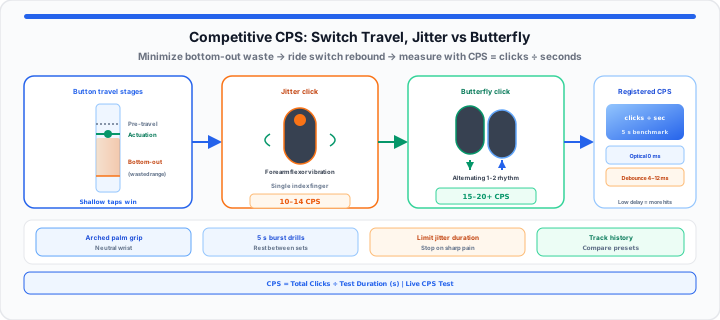
CPS Score = Total Registered Clicks ÷ Test Duration in Seconds
However, your raw score is constrained by two distinct vectors: biological neural actuation and mechanical switch geometry. When I’m profiling mechanical switch actuation values, I notice players often waste 60% of their finger motion pushing past the switch activation point into empty space.
If your mouse button has a deep pre-travel distance or a heavy bottom-out force, your finger travels unnecessary millimeters down and back up. Minimizing this physical travel range is the key to elevating your output without exhausting your flexor muscles. Three stages matter: pre-travel (rest to first contact), the actuation point (where the click registers), and bottom-out depth (extra travel that adds fatigue without adding inputs). Train shallow taps that stop near actuation, not full plunges into the shell.
You can track your raw click frequency instantly with our live, interactive CPS Test—use the 5-second preset to match competitive benchmark windows and compare burst scores against longer endurance runs on 30 or 60 seconds.
Step-by-Step: Master the Leading Competitive Clicking Techniques
To get started improving your physical click execution safely, follow these core procedural steps to build muscle memory while protecting your wrist joint:
- Adopt an elevated arched palm grip: Position your hand so your wrist joint remains hovering slightly above the mousepad rather than pressing flat against the desk surface.
- Isolate your fingertip placement: Place the pad of your finger directly over the front third of the left mouse button where physical lever mechanical advantage is highest.
- Engage shallow micro-flexion: Practice fluttering your finger a fraction of a millimeter off the button plate, tapping with light, shallow rebounds rather than full finger lifts.
- Train short burst intervals: Work in 5-second sprint sets rather than long endurance tests to condition fast-twitch muscle fibers without triggering forearm lactic acid buildup. Rest between sets with the Online Timer or log recovery gaps on the Online Stopwatch—keep the countdown in a pinned browser tab so you do not unlock your phone mid-practice (see our browser tab timer deep work guide).
- Calibrate in-game crosshair DPI: Lower your mouse sensor DPI slightly during high-speed clicking drills to keep your aim crosshair centered during physical button vibrations.
The Jitter Clicking Method
Jitter clicking converts controlled muscle tremors in your forearm directly into high-frequency finger strikes. Instead of bending your finger joint up and down, you lock your wrist in a neutral alignment and deliberately tense your forearm flexor muscles to generate a continuous vibration that transfers straight to your fingertip.
In our input latency testing, jitter clicking yields scores between 10 to 14 CPS. However, because this technique relies on sustained muscular tension, it requires strict operational limits. Never sustain jitter clicking for more than a few seconds at a time, and immediately drop the mouse if you feel sharp tightness along your arm.
The Butterfly Clicking System
The butterfly clicking system abandons single-finger tapping entirely. By hovering both your index and middle fingers over a single wide mouse button, you execute an alternating double-strike rhythm. One finger hits the switch as the second finger lifts off, effectively doubling your input frequency potential.
When set up on a mouse switch with low debounce delays, a clean butterfly cadence can push scores up to 15 to 20 CPS. The secret lies in cadence, not force: tap in a fluid 1-2-1-2 rhythm rather than slapping the switch housing violently. If your score plateaus near 10 CPS despite fast finger motion, firmware debounce or worn mechanical bounce may be filtering inputs—see our mouse double-clicking hardware faults in-browser guide for slow-click interval audits versus true switch failure.
Hardware Hacks: Choosing Mice with Ultra-Low Actuation Latency
Moving onto gear dynamics, your physical technique can only perform as well as your mouse hardware allows. Traditional mechanical microswitches rely on physical metal contact leaves that vibrate when struck. To prevent false double-inputs, mouse manufacturers program a “debounce delay” into the device firmware—forcing the controller to ignore clicks for 4 to 12 milliseconds after every actuation.
For high-level competitive clicking, look for mice featuring optical switches or custom firmware with adjustable debounce timers. Optical switches use an infrared light beam to detect button actuation, eliminating contact bounce entirely and permitting near-zero debouncing delay.
Shell rigidity matters just as much. Flexing sidewalls absorb kinetic energy, dampening your finger taps. Look for a stiff top plate with split-button keycaps that isolate the click mechanism from the main housing shell.
Instead of guessing whether your hand posture is actually increasing your speed or risking a muscle strain over long sessions, open our CPS Test to track your raw click frequency and registration trends across different time frames instantly. The built-in history table stores recent runs locally so you can compare jitter versus butterfly sessions after grip or debounce changes.
The Real-World Scoring Grid: Where Do Your Speeds Rank?
Here is how competitive CPS ranges translate across gaming titles and physical skill tiers:
| CPS Range | Performance Skill Tier | Typical In-Game Application | Physical Strain Risk |
|---|---|---|---|
| 3.0 – 5.9 CPS | Casual / Standard Desktop | Web browsing, turn-based strategy, casual RPGs | Minimal / Low |
| 6.0 – 8.9 CPS | Intermediate Gamer | Standard FPS tapping, MOBA ability cycles | Low / Moderate |
| 9.0 – 11.9 CPS | Advanced Competitive | High-tier FPS semi-auto firing, Minecraft normal PvP | Moderate |
| 12.0 – 14.9 CPS | Expert Jitter / Butterfly | Minecraft speed-bridging, competitive combo PvP | Elevated (requires rest breaks) |
| 15.0+ CPS | Elite Hardware / Butterfly | Peak combo locking, custom benchmark testing | High (strict ergonomic control required) |
Map percentage improvements after practice with the Percentage Calculator when your 5-second click total jumps from, say, 40 to 48 registered hits in the same window.
Open CPS Test Open Online Timer
Frequently Asked Questions
What is a good average score on a 5-second CPS test for competitive gaming?
For standard gaming, an average score between 6.5 and 8.0 CPS using standard single-finger clicking is solid. Competitive Minecraft PvP players using jitter or butterfly techniques typically target 12 to 16 CPS over a 5-second benchmark window.
Can practicing high-speed clicking styles cause long-term wrist strain or carpal tunnel?
Yes, improper form—especially locking the wrist against a desk while executing jitter clicks—can lead to wrist fatigue, tendinitis, or carpal tunnel syndrome. Always keep your arm supported, maintain a neutral wrist alignment, and limit intense high-speed clicking drills to short practice intervals with ample rest.
How do modern mouse debounce time settings affect your final clicks per second score?
Debounce time dictates the firmware delay between recognized click registrations. Lowering debounce times to 0–2 ms allows light switch rebounds (such as double-strikes in butterfly clicking) to register as separate inputs, significantly boosting your CPS score. However, setting debounce too low on older mechanical switches can cause unintentional double-clicking during daily desktop browsing.