
The Ghost Double-Click
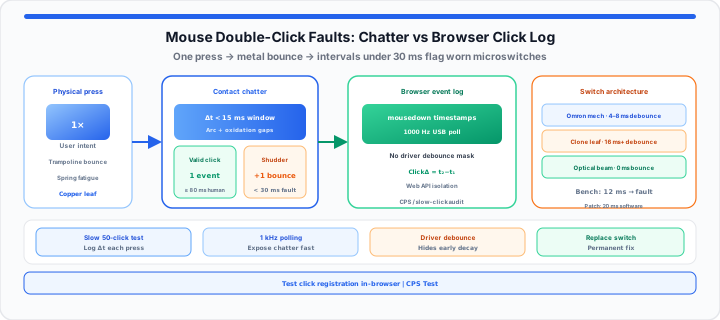
A video editor drops a critical timeline asset mid-project. A competitive gamer misses a game-winning shot completely. They reinstall graphics drivers. They replace expensive system memory. The true culprit is a worn mouse microswitch. An oxidized metal spring drops unwanted double clicks. In my peripheral auditing experience, hardware faults hide easily. Think of your mouse microswitch as a strict physical gatekeeper. It is a mechanical spring built to route electrical paths. Picture jumping hard on a springy playground trampoline. Your feet stomp down hard once on the fabric. The stretched surface shakes violently before holding still. It bounces multiple times before settling completely. Mouse microswitches chatter in the exact same way. Degraded metal leaves vibrate after a single physical press. Unfiltered mechanical shudder bounces register as extra inputs. System software logs these rapid bounces as real clicks. Isolating switch chatter requires testing raw millisecond click intervals.
The Microswitch Debounce Constant
Millisecond Click Intervals and Spring Fatigue Metrics
To get started, isolate mechanical chatter from intentional double presses. Human fingers cannot click faster than eighty milliseconds repeatedly. Switch contacts chatter within a fifteen millisecond window. A click under thirty milliseconds indicates hardware spring fatigue. Physical copper leaf contacts lose structural tension over time. Oxidation forms across internal metal contact points during use. Electrical current arcs across microscopic metal gaps unexpectedly. These physical gaps trigger duplicate electrical pulse signals. In our microswitch stress testing, mechanical switches degrade predictably. Optical switches eliminate physical metal contact bounce entirely. Light beams detect button actuation without mechanical contact legs. Testing raw input streams pinpoints failing hardware switches quickly. Early switch diagnostics prevent frustrating gaming performance drops. Understanding debounce timing helps users evaluate mouse health accurately. Hardware testing saves time spent troubleshooting software drivers pointlessly. Accurate timing logs confirm whether switches require physical replacement.
You can verify your baseline switch parameters instantly with our in-browser CPS Test. Gamers can simulate input integrity with our interactive click test utility—use slow, deliberate single clicks and watch whether the registered count jumps by two on one press. For high-speed butterfly cadence versus debounce caps (not switch failure), see our jitter and butterfly clicking competitive CPS guide.
Click Interval = Time_Current − Time_Prior
Safe Debounce Threshold = Base Switch Response + Delay Vector
| Hardware Switch Architecture | Real-World Lifespan Cycles | Vulnerability to Double-Click Stutter | Required Software Debounce Windows |
|---|---|---|---|
| Standard Mechanical Copper Leaf | 20 Million Clicks | High Vulnerability | 8ms to 12ms Delay |
| Japanese Omron Premium Mechanical | 50 Million Clicks | Moderate Vulnerability | 4ms to 8ms Delay |
| Infrared Optical Light-Beam Sensor | 90 Million Clicks | Zero Vulnerability | 0ms Delay |
| Low-Tier Unbranded Clone Component | 5 Million Clicks | Extreme Vulnerability | 16ms+ Delay |
The Polling Rate Latency Matrix
USB Polling Rates and Signal Filtering Boundaries
Moving onto signal transmission, USB polling rates impact logging accuracy. High polling rates report mouse states every single millisecond. A one thousand Hertz polling rate captures subtle contact vibration. Higher polling rates expose hardware defects faster in tests. Software drivers often hide hardware faults using forced delays. Forced driver delays add noticeable input latency during gaming. In-browser testing bypasses bloated background software suites completely. Direct browser event listeners log raw physical switch interactions. Web APIs track exact millisecond timestamps between down events. When I profile click logs at the bench, browser event isolation excels. Browser benchmarks distinguish software driver lag from spring ruin. Isolating switch hardware protects competitive gaming performance metrics. Browser testing environments deliver clean input monitoring data instantly. Unfiltered browser event data reveals microswitch bounce patterns clearly. Eliminating background software interference isolates peripheral hardware flaws effectively. Real-time browser click tracking provides immediate feedback on switch integrity.
Users can map out raw input speeds using this free peripheral checker in the CPS Test. Technicians can test custom capture variables during bench testing across preset durations. Log lap-style gaps between deliberate clicks with the Online Stopwatch while you note timestamps manually. Compare unexpected duplicate registrations against tap cadence baselines from the digital tally foot-traffic guide when auditing shared office mice.
The Production Pipeline Component Audit
How to Re-Calibrate Dynamic Click Logs
In practical environments, immediate hardware replacement is not always feasible. IT administrators patch chattering office mice using software adjustments. Increasing software debounce algorithms filters out rapid metallic shudder. Custom registry edits extend minimum click delay windows safely. Temporary software patches prevent workflow interruption across office teams. Hardware replacement remains mandatory for permanent switch restoration. Bench technicians analyze click duration metrics to evaluate peripheral degradation. Systematic switch audits help organizations manage office hardware budgets efficiently. Documenting hardware failure rates guides future peripheral purchasing decisions. Regular peripheral testing reduces unexpected downtime during critical work tasks. Below are primary diagnostic metrics from a bench audit.
- Device Under Test: Standard Ergonomic Office Mouse Model.
- Target Physical Switch: Aged Mechanical Copper Leaf Microswitch.
- USB Polling Frequency: Set to 1,000 Hertz interval rate.
- Logged Click Separation: 12 Millisecond separation recorded in log.
- Hardware Stutter Verdict: Confirmed physical contact chatter fault.
- Temporary Software Patch: Set debounce buffer to 20 milliseconds.
- Long-Term Action Plan: Replace worn internal mechanical switch assembly.
For browser-side device checks beyond clicks, see our fix blurry or inactive webcam in browser settings guide when diagnosing full workstation peripherals.
Open CPS Test Open Online Stopwatch
Frequently Asked Questions
How do you test if your mouse is double-clicking under the hood?
Click a web testing button fifty consecutive times slowly. Observe logged millisecond intervals between every registered press. Click intervals under thirty milliseconds signal physical hardware failure.
Why does an online browser click tool find peripheral hardware faults more accurately than local system settings?
Local operating system settings apply heavy software debounce filtering. Software filters mask early hardware decay from user view. In-browser testing captures raw physical switch signals without mask.
What is the difference between mouse double-clicking and software driver lag?
Double-clicking stems from physical metal leaf fatigue inside switches. Driver lag delays signal processing without firing duplicate inputs. Testing click intervals separates mechanical bounce from driver delays.
Can you fix a double-clicking mouse without buying new hardware?
Increasing software debounce delays temporarily masks mechanical chatter signals. Cleaning internal contacts with contact cleaner spray restores conductivity. Replacing internal microswitches permanently resolves hardware double-clicking faults.