
The Fire Code Violator Trap
You guess your holiday store crowd size during peak hours. Your massive weekend sales event is completely packed. A local safety inspector walks through your front entrance. They issue a heavy local fire code citation instantly. Your active occupancy exceeded structural building limits unexpectedly. In my loss prevention experience, guessing foot traffic fails.
Store supervisors struggle with unpredictable door surges daily. Mechanical thumb clickers jam when pressed too quickly. Floor staff drop metal tally counters onto hard floors. Dropped mechanical counters reset their internal gears unexpectedly. Dropped devices scramble crucial door count logs instantly.
Think of a shop entryway like a busy highway toll booth. Counting cars from memory scrambles numbers within ten minutes. A digital clicker acts like an automated pressure strip. It registers every single axle bump with zero brain drag. Think of a web-native tally tool as a clean digital scoreboard. It is a persistent number trap built to lock crowd movements. Digital tally tools eliminate mechanical hardware failure risks completely. They provide clean data for store managers instantly.
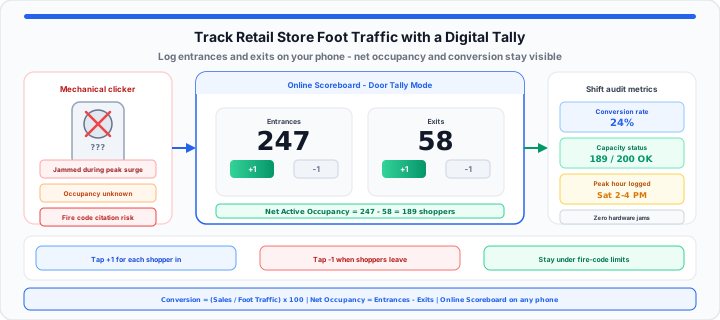
Instant Door Tally: Label one column Entrances and one Exits on our Online Scoreboard. Tap plus and minus on any phone to log doorway influx without mechanical hardware.
The Continuous Spatial Influx Baseline
To get started, measure raw doorway footprint traffic volume daily. Store entry volume sets your maximum potential revenue cap. In our storefront testing, precise entrance counts reveal hidden opportunities. High traffic paired with low sales indicates poor floor layouts. Untracked entry doors hide critical retail loss points.
Manual door counts establish clear daily traffic baselines. Reliable baseline numbers help schedule floor staff efficiently.
Conversion Efficiency = (Total Sales Transactions ÷ Gross Foot Traffic) × 100
Net Active Occupancy = Gross Entrances − Gross Exits
Simulate your crowd metrics with our Online Scoreboard now. Verify conversion percentages on the Percentage Calculator. Test rapid tap response on the CPS Test to confirm your device handles peak-hour surges. Digital logging removes hardware jam friction completely. Fast count validation protects your store against capacity compliance fines. Review our structured traffic logging comparison reference guide below.
| Logging Method | Setup Cost Friction | Freedom from Hardware Jams | Portability for Floor Staff |
|---|---|---|---|
| Automated Beam Sensors | High (Wiring Needed) | Low (Sensor Alignment Flaws) | None (Fixed Door Position) |
| Mechanical Metal Clickers | Low (Cheap Hardware) | Zero (Prone to Mechanical Jams) | Medium (Bulky Pocket Tool) |
| Zero-Install Browser Counters | Zero (Instant Web Access) | High (Digital Screen Interface) | Absolute (Runs on Any Phone) |
The Occupancy Ceiling Margin
Moving onto capacity management, physical safety limits demand strict balance. When I run live door tallies, peak crowds surge rapidly. Unmonitored storefront entry gates breach legal safety limits quickly. Overcrowded sales floors increase loss prevention risk factors significantly. Door staff must subtract departing visitors from entrance totals continuously. Web-native tally tools calculate real-time net counts on mobile screens.
Map out your real-time capacity numbers using our Online Scoreboard. Time peak-hour windows with the Online Stopwatch or Online Timer to align staffing with influx curves.
Peak-Hour Customer Surges
Promotional marketing campaigns trigger intense customer arrival spikes. Rapid door counts require instant display button responses. Physical metal tally buttons stick during high-frequency tapping. Digital touch interfaces prevent missed counts during heavy surges. High-contrast screen numbers keep door controllers informed instantly. Accurate entrance logs prevent dangerous over-capacity structural conditions.
Structural Exit Subtractions
Tracking active building volume requires recording every departing shopper. Subtracting exit streams maintains true real-time floor occupancy balances. Digital clickers feature prominent subtract controls on touch screens. Floor supervisors update active room tallies with single taps. Real-time exit tracking prevents unnecessary entrance holds at doors. Balanced occupancy counts protect retail stores during busy shifts.
Mobile Screen Latency Limits
High-volume entry counting demands zero touchscreen input display lag. Web clicker applications process inputs directly inside active device RAM. Local browser execution prevents dropped tallies during rapid tapping. Oversized touch targets accommodate large thumb taps with ease. Run a quick latency check on the CPS Test before peak shifts. Low screen latency ensures precise crowd count tracking accuracy.
The Production Shift Conversion Audit
In practical environments, match doorway logs against cash register receipts. Comparing overall foot traffic against sales reveals true conversion rates. Low conversion rates highlight poor sales performance or bad layouts. Store managers optimize shift staffing based on hourly traffic curves. Digital tally logs eliminate manual pen and paper counting errors.
Tracking entrance data uncovers hidden revenue bottlenecks across store zones. Reliable traffic logs empower supervisors to make data-backed operational decisions. Review these core retail performance metrics for floor audits:
- Target Sales Conversion Efficiency: Maintain 20 to 30 percent — verify on the Percentage Calculator.
- Maximum Floor Occupancy Threshold: Enforce local building safety limits.
- Average Customer Dwell Duration: Measure total minutes spent shopping with the Online Stopwatch.
- Peak Hourly Influx Window: Identify high-volume customer arrival shifts.
- Screen Tally Response Latency: Maintain sub-10 millisecond processing speed.
- Floor Staffing Coverage Ratio: Maintain one worker per ten shoppers.
- Register Checkout Velocity Standard: Process transactions under two minutes.
- Promotional Margin Impact: Model campaign discounts on the Discount Calculator and Margin Calculator.
Start Door Tally Now Test Tap Response Speed
Use our Online Scoreboard to audit your retail foot traffic now. Digital tallying eliminates hardware jams and lost counts completely. It guarantees clean, actionable crowd data for store managers.
Frequently Asked Questions
- How do you calculate retail store traffic manually?
- Station door staff at main entrances with a digital clicker. Tap the screen counter for every entering retail customer. Subtract departing shoppers to calculate accurate net occupancy levels.
- Why use a digital clicker counter over mechanical tools?
- Mechanical clicker tools jam frequently during rapid customer surges. Digital screen clickers eliminate mechanical hardware jam risks entirely. Online tally tools run instantly without purchasing expensive hardware.
- How does tracking foot traffic improve retail sales conversion?
- Door traffic logs reveal exact total store visitor counts. Compare total store visitors against completed checkout register receipts. Low sales conversion rates highlight floor staffing or layout issues.
- Can a phone screen tally tool track multi-door entrances?
- Assign dedicated door staff members to each active entrance gate. Combine individual door counts into total store traffic metrics. Maintain precise building occupancy counts across all store doors.