
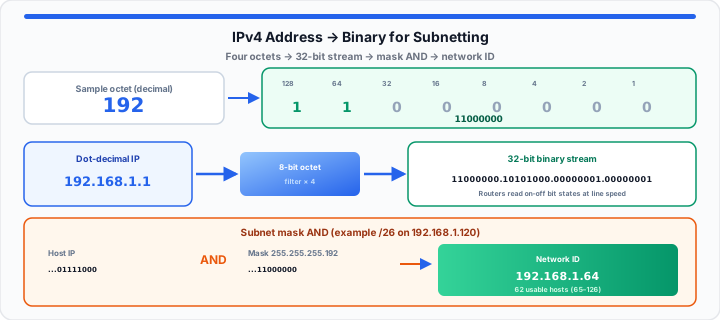
Guessing subnet boundaries triggers disastrous routing collisions fast. Unmapped IP scopes crash enterprise server clusters during peak traffic. In our packet routing testing, overlapping gateways cause silent packet loss.
An enterprise administrator expanded a local vLAN without checking masks. Duplicate host assignments froze fifty production workstations in seconds. Network outages burn money while engineers scramble at the console. Staring at raw dot-decimal strings under pressure causes panic.
Think of your IP address as a strict digital scoreboard. It uses four isolated bit vaults to route spatial packets cleanly. Picture four eight-slot egg cartons resting on your workbench. Each individual slot stays empty at zero or holds an egg. An egg inside a slot represents an active binary one. You cannot force a large decimal number into one carton slot. Distribute your value across all eight slots by positional weight. Hardware switches read these exact on-off states instantly at line speed. Mastering binary conversion eliminates dangerous subnetting mistakes forever. You can simulate network translations with our IP Address Converter to check every octet without scratch-paper errors.
The Dot-Decimal Positional Constant
To get started, parse the four separated integers of IPv4 addresses. Standard IPv4 addresses contain four distinct numerical values called octets. Periods separate each octet in a standard dot-decimal string. Every octet represents exactly eight bits of binary data payload. Four octets combined yield a total 32-bit address space.
When I audit malformed subnet scopes at the terminal, errors hide. Engineers see decimal notation, but routers process raw binary streams. Decimals serve human readability while binary drives hardware routing logic. An octet ranges strictly from zero up to 255 decimal. A value of zero maps to eight consecutive binary zeros. The maximum value 255 maps to eight continuous binary ones. Understanding this boundary is vital for precise network scope design. You can verify baseline octet configurations instantly in the converter or drill bit toggles on the Binary Calculator.
Classful Network Masks
Legacy networking split IP addresses into explicit class boundaries. Class A networks reserve the first octet for network IDs. Class B networks utilize the first two octets for networking. Class C networks assign three full octets to network identification. Modern routers bypass classful constraints using variable length subnet masks. For a modern walkthrough of mask bits and host math, see our Subnet Mask beginner guide.
CIDR Notation Boundaries
Classless Inter-Domain Routing uses slash notation to declare network masks. A slash 24 mask specifies twenty-four continuous binary network bits. The remaining eight bits identify specific host addresses within subnets. Network masks isolate the network ID from assigned host addresses. Precise CIDR boundaries stop route summarization failures in core backbones. Paste any CIDR into the IP Subnet Calculator to see network, broadcast, and host ranges without manual AND work.
The 8-Bit Octet Bitwise Matrix
Moving onto base-2 arithmetic, examine positional bit fields vertically. Each bit inside an octet holds a fixed exponential power. Positional values double consistently from right to left across octets. The far right bit represents two raised to power zero. This position carries a decimal weight of exactly one. The far left bit represents two raised to power seven. This dominant position carries a decimal weight of 128. The bit weights read 128, 64, 32, 16, 8, 4, 2, and 1.
In my production deployment experience, calculating these fields saves time. Mathematical evaluation follows this rule strictly:
Decimal Value = Σ(Biti × 2Position)
To convert decimal to binary, evaluate positional weights from left. Compare your decimal target against the highest positional bit weight. If the target equals or exceeds 128, toggle that bit on. Subtract 128 from your target and process the remaining value. If the target stays smaller than the bit weight, write zero. Repeat this subtraction logic across all eight positional columns sequentially. Map out low-level data points using our Binary Calculator, or paste full addresses into the IP Address Converter for decimal, binary, and hex in one view. If you also export addresses for packet captures, cross-check with our IPv4 to hex guide.
Wildcard Bit Inversions
Access control lists evaluate network scopes using wildcard mask inversions. Wildcard masks flip subnet mask binary bits completely inside out. Subnet mask binary ones become active zeros inside wildcard masks. Binary zeros transform into active match ones for access filters. Inverting bits allows firewalls to inspect specific host address blocks.
| Bit Position Weight | Active Bit Calculation | Sample Octet Target Value | Resulting Binary Octet Output |
|---|---|---|---|
| 128 + 64 | 128: ON, 64: ON, Others: OFF | 192 Decimal | 11000000 Binary |
| 128 + 32 + 8 | 128: ON, 32: ON, 8: ON, Others: OFF | 168 Decimal | 10101000 Binary |
| 8 + 2 | 8: ON, 2: ON, Others: OFF | 10 Decimal | 00001010 Binary |
| 128 + 64 + 32 + 16 + 8 + 4 + 2 + 1 | All Positional Bits Set to ON | 255 Decimal | 11111111 Binary |
The Production Subnet Mask Alignment
In practical environments, routers execute logical bitwise AND operations. Hardware switches compare IP addresses against subnet masks bit by bit. A bitwise AND yields one only when both bits equal one. If either bit equals zero, the resulting output bit stays zero. This alignment extracts the precise network ID from an IP address. Host bits clear to zero during bitwise AND filtering passes. Host capacity derives directly from total available zero host bits. Calculate host limits using:
Total Subnet Hosts = 2(32 − Mask Bits) − 2
Subtracting two reserves the network ID and broadcast address targets. Below are core diagnostic parameters from a live subnet audit — confirm the same numbers in the IP Subnet Calculator:
- Raw Input Decimal IP Address: 192.168.1.120 standard host address.
- Assigned Subnet Mask Boundary: 255.255.255.192 or slash 26 CIDR.
- Binary Host Address Payload: 11000000.10101000.00000001.01111000 converted bit stream.
- Binary Subnet Mask Payload: 11111111.11111111.11111111.11000000 bitwise filter.
- Extracted Network ID Stream: 11000000.10101000.00000001.01000000 calculated route.
- Calculated Network ID Decimal: 192.168.1.64 primary subnet network route.
- Broadcast Address Decimal Target: 192.168.1.127 final host broadcast target.
- Usable Host Range Boundaries: 192.168.1.65 through 192.168.1.126 active addresses.
- Total Available Usable Hosts: 62 individual assignable node slots.
Quick check: Enter 192.168.1.120/26 in the
IP Subnet Calculator or paste
192.168.1.120 into the
IP Address Converter to see the full 32-bit binary string.
Open IP Address Converter Open IP Subnet Calculator
Frequently Asked Questions
How do you accurately convert an IPv4 address to binary manually?
Split the IP address into its four individual decimal octets. Compare each octet value against positional bit weights from 128 down. Write a binary one if the value fits the weight. Subtract the weight from the value and move rightwards next. Write a zero if the weight exceeds the remaining value.
Why does a subnet mask use a continuous stream of binary ones to split network IDs?
Continuous binary ones define the contiguous network portion of addresses. Hardware switches perform fast bitwise AND operations using these masks. Solid blocks of ones isolate network IDs from host bits. This continuous boundary prevents fragmentation during packet routing lookup procedures.
What is the difference between an IP address octet and a byte?
An octet consists strictly of eight individual binary bit positions. A byte also contains eight bits in standard computing architectures. In networking, octet explicitly clarifies an exact eight-bit group size. The terms octet and byte function interchangeably across IPv4 networking.
How does CIDR notation simplify subnet mask calculations?
CIDR notation replaces four dot-decimal octets with a slash count. The slash number indicates the total active binary network ones. A slash 28 specifies twenty-eight active network bits in masks. Engineers calculate network boundaries quickly without writing full octet strings.