
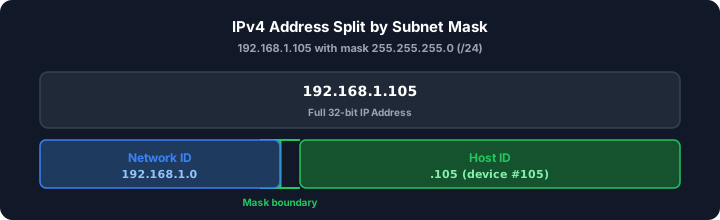
The first time I opened a switch management page and saw 255.255.255.0 sitting beside an IP like 192.168.1.105, I assumed someone had typed a phone number by mistake. Routers do not read these strings the way humans do — they treat every address as a 32-bit binary value and use the subnet mask as a stencil that separates "which neighborhood" from "which house on the block." Once that clicks, subnetting stops feeling like memorization and starts feeling like address planning.
Think of a subnet mask as a sorting filter at the post office. The network portion works like a zip code that bundles mail for an entire street. The host portion is the house number that pinpoints one mailbox. Your router reads both parts together every time it decides whether traffic stays local or gets forwarded upstream.
Phase 1: Breaking Down the Binary Filter
IPv4 addresses look friendly in dotted decimal, but routers overlay them with subnet masks at the bit level. A mask is 32 bits long, just like the address. Where the mask holds a 1, that bit belongs to the network. Where it holds a 0, that bit identifies the host.
Take 255.255.255.0. In binary, the first three octets are all ones — eight 1 bits per octet across twenty-four positions — and the final octet is all zeros. When I configure a switch rack for a small office LAN, that pattern means the first three numbers (192.168.1) define the shared network segment while the last number (.105) picks out one machine among up to 254 possible hosts.
Junior engineers often freeze at the binary step. You do not need to live in base-2 forever, but one worked example builds the mental model fast — our IP address to binary guide walks octet weights and mask AND math step by step. Address 192.168.1.105 with mask 255.255.255.0:
- Network address: 192.168.1.0 — host bits all zero; identifies the subnet itself.
- Broadcast address: 192.168.1.255 — host bits all one; reaches every device on the segment.
- Usable host range: 192.168.1.1 through 192.168.1.254 — where printers, laptops, and access points live.
In our deployments, mis-set masks cause the classic symptom: a device gets an IP but cannot reach its default gateway. The workstation thinks it shares a local network with a gateway that actually sits on a different subnet. Fixing the mask (or the IP) realigns the binary boundary and traffic flows again.
Phase 2: From Subnet Masks to CIDR Notation (The Short-Hand Formula)
Writing 255.255.255.0 on a whiteboard gets old quickly. Network teams adopted CIDR slash notation to count how many leading bits are network bits. A /24 means 24 ones followed by 8 zeros — the same mask, fewer characters. When I hand off VLAN documentation to a cabling contractor, slash notation saves a page of typos.
Host bits (h) = 32 − CIDR prefix (p)
If someone assigns /26, subtract 26 from 32 and you get 6 host bits. That single subtraction replaces a full binary rewrite on scratch paper. To get started with your own address plan, you can check your network bounds with our subnet tool — paste a CIDR like 10.0.0.0/22 and skip the manual binary arithmetic for network address, broadcast, and usable host count.
CIDR-to-subnet mask conversion table
Moving onto the numbers you will see daily in DHCP scopes, firewall rules, and cloud VPC panels:
| CIDR | Subnet mask | Usable hosts |
|---|---|---|
| /24 | 255.255.255.0 | 254 |
| /25 | 255.255.255.128 | 126 |
| /26 | 255.255.255.192 | 62 |
| /27 | 255.255.255.224 | 30 |
| /28 | 255.255.255.240 | 14 |
| /30 | 255.255.255.252 | 2 (typical point-to-point link) |
In practical environments, a /30 shows up on router-to-router links where only two endpoints need addresses. A /24 remains the default mental model for a flat office LAN — enough room for desks, VoIP phones, and a handful of IoT sensors without wasting an entire /16 block on one floor.
Phase 3: Sizing Your Network Boundaries (Host Allocation)
Subnetting is not just about carving addresses — it is about right-sizing broadcast domains. Every device on the same subnet hears broadcast traffic from its neighbors. Split a growing office into /26 chunks and you reduce chatter while keeping enough seats per VLAN for each department.
Total addresses = 2h
Usable hosts = 2h − 2
The subtraction is non-negotiable. Every subnet burns two addresses that never get assigned to a keyboard or camera. The network address anchors the route table entry. The broadcast address reaches all hosts simultaneously — useful for ARP and DHCP, but not assignable. Skip this step in a spreadsheet and your DHCP scope will overlap those reserved slots, which produces the maddening "IP conflict" alert at 2 a.m.
Worked example: planning a /26 office VLAN
In my routing experience, /26 is the sweet spot when a single department outgrows a /28 but does not need a full /24. Host bits: 32 − 26 = 6. Total addresses: 26 = 64. Usable hosts: 64 − 2 = 62.
For network 10.10.50.0/26, the reserved addresses are 10.10.50.0 (network) and 10.10.50.63 (broadcast). DHCP can safely hand out 10.10.50.1 through 10.10.50.62. Compare that to a /24 on the same 10.10.50.0 block — you would waste dozens of addresses if the department only has forty workstations. Tighter masks keep your private RFC 1918 space from running dry across multiple sites.
Another analogy that helps new hires: a corporate phone system uses a main number (network) plus four-digit extensions (hosts). The subnet mask defines how many extension digits exist. A /28 gives you 4 host bits — only 14 extensions. A /24 gives 8 host bits — 254 extensions. Same building, different extension length, same math.
Common Subnet Mask Questions
What is the default subnet mask for a Class C network?
The traditional Class C default is 255.255.255.0, written as /24. Eight host bits remain, which yields 254 usable addresses. Modern networks ignore strict classful boundaries, but you will still hear "Class C mask" on legacy certification exams and old runbooks.
How many hosts are in a /26 subnet?
Six host bits produce 64 total addresses. Subtract the network and broadcast reservations and 62 addresses are available for devices. That size fits a single department VLAN comfortably.
What does a subnet mask actually do?
It separates the network identifier from the host identifier inside a 32-bit IPv4 address. Routers AND the address with the mask to decide local delivery versus forwarding to a gateway. Wrong mask, wrong neighborhood — packets never arrive.
Why do you subtract 2 when calculating usable hosts?
The first address (all host bits zero) names the subnet. The last address (all host bits one) broadcasts to every host on that subnet. Neither can be assigned, so usable count is always 2n − 2.
How do I convert /24 to a subnet mask?
Write 24 consecutive 1 bits, then pad with zeros to 32 bits. Group into four octets of eight and you get 255.255.255.0. Or paste /24 into the IP Subnet Calculator and read the dotted-decimal mask, network address, and broadcast in one pass.