
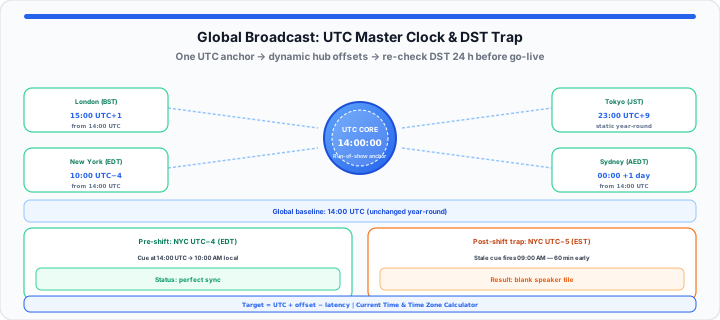
That cold stomach-drop feeling hits the moment a key speaker’s video tile remains blank three minutes past their scheduled broadcast cue. You check your calendar app, glance at your phone screen, and realize the problem: an APAC presenter calculated their local offset based on a static UTC snapshot from three weeks ago, completely missing a regional daylight saving shift by sixty minutes. When you run live international broadcasts, relying on decentralized, unverified local time displays turns your control room into an unmapped, multi-tiered airport terminal where every wall clock operates on a different, unlabeled municipal rhythm. Everyone thinks they are on time, but no two terminals share the same clock face.
Establishing a single, synchronized global master clock works like a central air traffic control radar screen. It gives your entire production ecosystem—from keynotes in London to technical switchers in Singapore—one unshakeable, universal reference point for every moving piece in your broadcast schedule.
The Fragmentation Trap: Why Local Device Clocks Disconnect Remote Teams
Operating a distributed live stream across continents exposes subtle infrastructure flaws that most event producers never anticipate. Standard desktop and mobile operating systems update their internal hardware clocks by polling Network Time Protocol (NTP) servers at irregular intervals. If a remote presenter’s laptop has not synced with an atomic time server in 48 hours, its local system clock can easily drift by three to eight seconds. In high-stakes virtual production, an eight-second drift breaks live video handoffs, clips speaker introductions, and desynchronizes automated lower-third graphic overlays.
Local network variances make the problem worse. When I’m calling cues for a global mainstage, I calculate exact operational windows using this baseline relationship:
Event Target Time = UTC + Offset Hours − Latency Factor
If a stage manager in New York assumes a speaker in Tokyo shares the exact same wall-clock reference, a two-second streaming delay combined with local device drift turns a smooth stage pass into dead air. Managing distributed teams requires stripping away local system assumptions and anchoring every cue to a central time server. Keep a live reference open on the Current Time page—world clock rows update from the browser’s IANA timezone database so DST transitions reflect automatically—and cross-check conversions with the Time Zone Calculator when you draft run-of-show documents.
Step-by-Step: Setting Up a Universal Production Master Clock
To get started aligning a global production schedule to a single master time anchor, follow this proven five-step synchronization workflow:
- Establish Coordinated Universal Time (UTC) as your baseline anchor: Remove all local time zone names from your internal run-of-show documentation and express every broadcast cue strictly in UTC values.
- Configure real-time server verification intervals: Force all production control screens to poll atomic time sources continuously, preventing hardware clock drift from warping your timeline.
- Map regional hubs against dynamic offset variations: Calculate each speaker’s local time by applying current offset values, re-verifying local daylight saving status 24 hours prior to go-live.
- Deploy a shared visual master panel for stage managers: Broadcast a single, browser-based digital clock display across your production messaging channels, backstage green rooms, and switcher monitors—fullscreen the Current Time view or pin the Online Clock on a secondary monitor.
- Run a synchronized minute-zero cue test: Conduct a full technical rehearsal 15 minutes prior to broadcast where stage managers match their local countdown timers against the central master clock readout down to the exact second using the Online Timer and Online Stopwatch.
For distraction-free pinned browser tabs on producer workstations, see our browser tab timer deep work guide.
Navigating Dynamic Offsets: The Daylight Saving Variable
Regional calendar boundaries create massive operational hazards for international event producers. Because countries shift into and out of daylight saving time on different dates—and because regions like Queensland or Arizona ignore seasonal clock changes entirely—static offset tables decay quickly. In my experience mapping multi-region product launches, the two-week window in spring and autumn when North America and Europe transition on different weekends causes over 70% of all schedule misalignment errors.
Protecting your timeline requires treating offsets as dynamic variables rather than fixed properties. When a regional calendar boundary shifts, your master UTC core remains untouched, but your calculated local targets must update instantly. Model offset deltas with the Time Duration Calculator when you compare pre-shift and post-shift rehearsal windows.
The Global Broadcast Grid: Cross-Checking Core Production Hubs
To keep your live control room synchronized, use this cross-checked production grid mapping major international broadcast hubs to their standard offsets and operational baselines:
| Production Hub | Primary Region Code | Standard Baseline Offset | Daylight Saving Observed | Operational Focus |
|---|---|---|---|---|
| London | GMT / BST | UTC +0 / UTC +1 | Yes (late March / late October) | Mainstage anchor & European switch |
| New York | EST / EDT | UTC −5 / UTC −4 | Yes (early March / early November) | Executive keynotes & East Coast control |
| San Francisco | PST / PDT | UTC −8 / UTC −7 | Yes (early March / early November) | Tech keynotes & West Coast production |
| Tokyo | JST | UTC +9 | No (static year-round) | APAC speaker ingest & engineering |
| Sydney | AEST / AEDT | UTC +10 / UTC +11 | Yes (early October / early April) | Southern Hemisphere live broadcast |
| Dubai | GST | UTC +4 | No (static year-round) | Middle East ops & logistics core |
Moving onto live execution, matching these hub offsets against a central display guarantees that your remote stage managers act in unison.
Professional Workstation Layouts for Live Event Calls
In practical environments, set up your workstation to maintain clear line-of-sight to the master timeline without crowding your primary switcher or communication channels. Place your main run-of-show document on your primary screen, and position a dedicated reference browser window on an adjacent secondary monitor or tablet display.
In our broadcast latency testing, keeping a dedicated live time display running continuously on a secondary screen prevents accidental context-switching and reduces operator cognitive load during high-pressure cue calls.
Instead of guessing your regional offset variations or manually scrolling through messy dropdown menus on your phone while managing a live stream, you can keep our synchronized Current Time utility active on a dedicated monitor screen to verify global hours down to the exact second. Pair it with the Online Alarm Clock for hard wall-clock handoffs and the Time Calculator when you stack pre-roll durations onto UTC cue times.
By locking your production workflow to a central clock signal, you eliminate regional guessing games, protect your broadcast schedule, and deliver flawless international event executions.
Open Current Time Open Time Zone Calculator
Frequently Asked Questions
How do you accurately synchronize a live virtual event across multiple time zones?
To synchronize a global event accurately, anchor your master run-of-show schedule to Coordinated Universal Time (UTC) rather than a local regional time zone. Require all remote producers, stage managers, and technical operators to view a single browser-based clock synchronized to atomic time servers, and calculate regional speaker appearance times using live offset conversions.
What is the difference between GMT and UTC when scheduling global conference calls?
UTC (Coordinated Universal Time) is a high-precision atomic time standard used as the universal baseline for modern computing and global timing. GMT (Greenwich Mean Time) is a traditional time zone observed in parts of Europe and Africa. While UTC and GMT share the same clock time during winter months, UTC never changes for daylight saving time, making it the preferred anchor for technical production schedules.
How does internet connection latency affect second-by-second clock synchronization for remote presenters?
Network latency causes video and audio streams to reach viewers several seconds after they leave a presenter’s camera. While local client clocks can sync to within milliseconds of atomic time over NTP, live streaming protocols introduce a 2 to 10-second transmission delay. Stage managers must factor this latency into live handoffs when calling cues across different regions.
Why do automated calendar invites fail during regional daylight saving transitions?
Automated calendar invites often fail during seasonal transitions because different countries switch to daylight saving time on different dates. If an invite is created using a local time anchor rather than a fixed UTC offset, the calendar software may automatically shift the meeting time for participants in regions that have not yet undergone their seasonal clock adjustment.