
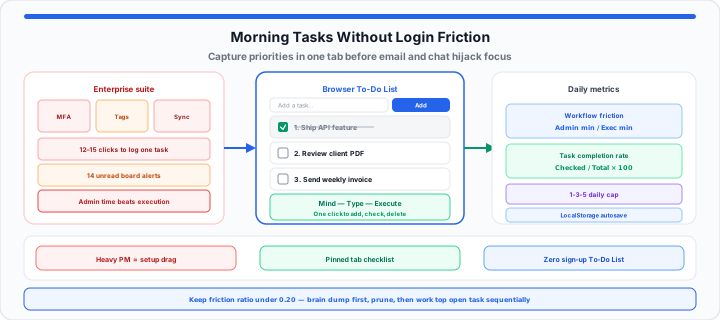
It happens every morning around 8:45 AM. You sit down with a fresh coffee, open your laptop, and attempt to write down three critical targets for the day. Instead of typing them out, you are greeted by a heavy enterprise software suite asking for a two-factor authentication code, prompting an app update, and surfacing fourteen unread team notifications across five nested project boards.
When I’m triaging my morning action items, fighting through three layers of sub-menus just to write down “call the supplier” is a guaranteed recipe for cognitive fatigue.
Using a bloated, feature-heavy project suite to manage simple personal daily priorities is like rolling a massive, industrial steel file cabinet directly in front of your office door. To record a basic thought, you have to slide open heavy rusted drawers, flip through numbered folder tabs, and unlock security bars just to drop in a single sticky note. A lightweight, zero-install browser checklist is like having a fresh, blank index card sitting right under your hand—completely friction-free, instantly accessible, and ready for immediate work.
The Productivity Paradox: Why Heavy Task Software Stalls Daily Execution
In our workflow velocity testing, we consistently observe a hidden trap: professionals spending thirty minutes customizing color tags, estimating story points, and nesting sub-tasks inside complex databases before they complete a single high-impact assignment.
This setup drag creates a false sense of accomplishment. You feel productive because you rearranged your dashboard, but your actual operational output remains zero. When task administration consumes more mental energy than execution, your focus splits before your core deep work window even begins.
Workflow Friction Score = Administrative Minutes ÷ Task Execution Minutes
When this ratio creeps above 0.20, you are spending more than twenty percent of your active workday simply organizing work rather than doing it. Eliminating account friction and software overhead brings that number back down toward zero.
Task Completion Rate % = (Checked Items ÷ Total Logged Items) × 100
To keep your daily completion percentage high, shorten the distance between thought and execution. The moment an actionable task enters your head, it belongs on a clean screen without intermediate steps. Track the ratio on the Percentage Calculator at day end and compare weekly averages on the Average Calculator.
Zero-login capture: Open the To-Do List in a pinned tab, type a line, press Add, and check tasks off as you finish. No account, no MFA, no nested boards.
Step-by-Step: Conducting a Morning Brain Dump for Immediate Clarity
To get started clearing mental chatter and restoring focus to your morning routine, follow this five-step task triage protocol using a single browser tab:
- Launch a blank browser tab anchor: Open the To-Do List immediately upon starting your computer, before opening email clients or team messaging channels.
- Execute an unedited thought purge: Type every pending deliverable, message reply, and quick operational task line by line without sorting or editing.
- Prune secondary clutter: Delete low-impact rows with the trash icon on tasks that do not advance today’s primary goals.
- Establish execution sequence: After pruning, add your highest-friction objective first so it stays at the top of the open queue, then layer medium and small tasks below (new lines append under earlier open rows).
- Work the list sequentially without tab-switching: Keep the tab pinned, complete the top open task, check it off, and let completed rows sink below active items automatically.
Raw mental clutter converts into a clear single-column action sequence in under sixty seconds. Draft longer notes in the Online Notepad, split color-coded themes on Online Notes, and paste distilled action lines into the checklist when you are ready to execute.
The 1-3-5 Execution Rule: Protecting Focus Across Inbound Demands
In practical environments, placing twenty items on a daily checklist creates immediate cognitive overload. When every line item looks equally pressing, decision paralysis sets in and work stops.
The 1-3-5 prioritization rule establishes structural boundaries for your work hours:
- 1 Critical Task: The core deliverable that defines success for your entire day.
- 3 Medium Tasks: Important operational targets tied to broader project milestones.
- 5 Small Tasks: Quick housekeeping items, such as clearing a specific document or sending a quick confirmation.
Enforcing this fixed structure prevents your core focus from getting derailed by secondary administrative requests. Pair deep blocks with the Pomodoro Timer or Online Timer, and guard interruption-free windows using the playbook in our browser tab timer deep work guide. Log billable focus minutes on the Time Duration Calculator when client work needs audit-friendly totals.
The Priority Blueprint: Matching Daily Frameworks to Your Focus Windows
Selecting the right prioritization framework depends on your specific work style and energy patterns. The structure below maps established productivity methodologies to their ideal operational conditions:
| Prioritization System | Core Structural Rule | Primary Benefit | Ideal User Profile |
|---|---|---|---|
| Ivy Lee Method | Log exactly 6 tasks each evening; execute in strict numerical order. | Eliminates morning decision friction. | Solo founders, copywriters, software developers. |
| 1-3-5 Rule | Limit daily output to 1 major, 3 medium, and 5 minor items. | Protects capacity against urgent incoming requests. | Account managers, project leads, agency staff. |
| Eat the Frog | Tackle your most difficult, high-friction task first thing in the morning. | Prevents procrastination on key deliverables. | Freelancers, students, remote consultants. |
| Eisenhower Box | Split items into Urgent/Important quadrants to isolate distractions. | Separates noise from high-value objectives. | Executive assistants, operations managers. |
| Time-Boxing | Assign dedicated, fixed minute blocks to every task line. | Builds realistic expectations for daily output capacity. | Engineers, researchers, technical writers. |
Moving onto workflow implementation, instead of burning your morning focus window wrestling with complex multi-layered enterprise dashboards or wasting time on account registration steps while your tasks pile up, you can open our interactive to-do list to draft, prune, and clear your daily checklist inside a clean browser window instantly. Shopping and errand lines belong on the Online Grocery List; mixed project notes stay on Calendar when you need date anchors instead of same-day execution rows.
Open To-Do List Start Focus Timer
Frequently Asked Questions
- Will closing my browser tab delete my interactive web to-do list items?
- No. The To-Do List writes to LocalStorage after each change. Reopen the page on the same browser profile to recover tasks unless you cleared site data or clicked Clear All.
- How does a zero-sign-up checklist protect deep work focus compared to phone notifications?
- A pinned browser tab does not emit push alerts or badge counts. You consult the list between focus blocks instead of reacting to mobile task apps that interrupt flow state.
- What is the best way to handle unfinished tasks on a daily browser-based list at the end of a workday?
- Delete stale rows, click Clear Completed, then add tomorrow’s lead task first so it stays at the top of your open queue when you return.