
The Admin Password Block
You sit down at a shared university computer terminal. You need to record an urgent spoken lecture summary. A giant system prompt demands an administrator password instantly. Local software installations are completely blocked on this network. In my production support experience, locked terminals stall work. Group policies restrict regular users from modifying system files. Public computer drives lock down local file system access.
Trying to install local apps is like plumbing permanent pipes. Building managers will block heavy plumbing projects immediately. Using an online browser recorder is like using a cup. You take a quick drink and toss it away. No permanent traces remain on the physical floor afterwards. Think of a browser-based recording channel as a temporary sandbox. It is an isolated memory pool processing live audio. Audio stays in RAM without spilling onto local disks. You capture crisp voice notes without system administrator privileges.
Modern web browsers run isolated processes for web pages. These web sandboxes bypass strict endpoint software restrictions. You bypass local software locks using native browser technology. This strategy protects your audio files on shared workstations. Let us analyze zero-install browser audio recording architectures now.
The Input Permission Constant
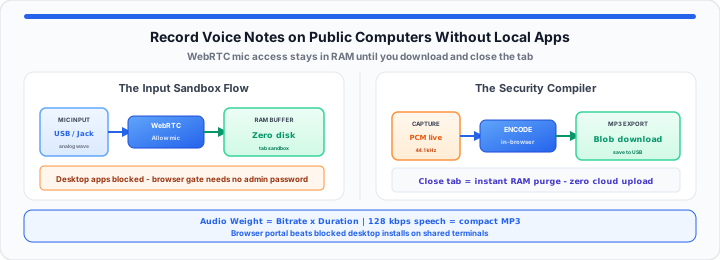
To get started, consider how web browser permissions function. Hardware microphones connect to public terminals via universal drivers. Browser engines access input hardware through native WebRTC APIs. When I audit public library terminal profiles, permissions reset. Closing active browser tabs clears temporary microphone access grants. The web application requests temporary access to input streams. You click allow within the top browser address prompt. The system creates an isolated audio processing pipeline instantly. Physical sound waves transform into digital PCM data streams. Browser engines apply automatic gain control to input feeds. Integrated noise suppression cleans ambient room background noise. Echo cancellation prevents feedback loops inside quiet study rooms. Audio hardware feeds directly into active browser memory buffers. No external software installation is required for audio capture. You can simulate session recordings with our Voice Recorder online. You can also verify microphone inputs with the Webcam Test before you record. Temporary stream permissions keep public computer hardware completely isolated. This structure bypasses local system installation restrictions safely. Evaluating hardware options helps select optimal recording methods quickly.
Calculate active tab memory allocation using standard browser variables:
Available RAM Buffer = Total System Memory − Active Tab Overhead
Calculate generated audio payload file size before direct export:
Audio Page Weight = Bitrate × Duration
Review our structured public computer audio capture reference table below.
| Capturing Option | Admin Bypass Speed | Freedom from Local Footprints | Direct MP3 Export |
|---|---|---|---|
| Native OS Desktop Tools | Slow (Blocked Access) | Low (Saves to Hard Drive) | Limited Compatibility |
| Third-Party Executables | Zero (Requires Admin Setup) | Zero (Leaves Registry Logs) | Varies by App |
| Zero-Install Browser Portals | Instant (No Admin Needed) | High (RAM-Only Sandbox) | Universal Direct MP3 |
The Local Sandbox Footprint Variable
Moving onto storage mechanics, local disk footprint security matters. In our lab endpoint testing, local caching leaves footprints. Standard desktop applications store cache files in local directories. Future public computer users can recover these temporary files. Forensic recovery tools can reconstruct deleted hard drive files. Browser sandboxing isolates live audio data within system RAM. Data never touches the public workstation hard drive storage. RAM buffers clear completely once you close the browser. Chromium process engines isolate memory for active open tabs. The V8 engine purges unused memory using garbage collection. Your private audio recordings vanish from system memory instantly. You can record audio using the Voice Recorder online. You can transcribe captured speech with Speech to Text directly after recording.
Web Microphone Permission Masks
Browsers isolate microphone streams inside individual tab sessions. Permission masks restrict external scripts from accessing input streams. Closing the tab destroys the active microphone session instantly. This prevents unauthorized audio tracking across browser sessions. Cross-origin isolation policies protect active audio input feeds.
Local RAM Caching Limits
Browser memory holds uncompressed audio during live recording. System memory allocation prevents disk writes during capture. Allocated RAM buffers flush cleanly upon session exit. This ensures complete privacy on shared workstation terminals. Volatile memory wipes clean when system power drops.
Audio Sampling Bitrates
Standard speech voice notes target 128 kilobits per second. Higher bitrates increase temporary RAM buffer memory footprint. Balanced bitrates optimize clarity while preventing browser memory crashes. Efficient sampling preserves browser performance during long recording sessions. Compact bitrates enable quick encoding inside low-power browser engines.
The Production Audio Compilation Protocol
In practical environments, compiling audio requires clean export formats. The browser MediaRecorder API encodes raw audio data packages. JavaScript WebAudio engines package PCM samples into compressed containers. Modern web apps use WebAssembly for fast audio encoding. WebAssembly compiles audio data directly inside the browser engine. Local client CPU threads render final output files locally. No audio data transmits to external cloud storage servers. Your voice note remains private throughout the compilation process. The system generates a temporary browser Blob URL link. Clicking download triggers a direct client-side file save action. The MP3 file transfers directly to your personal USB drive. Closing the tab invalidates the Blob URL immediately. No trace of the recorded file remains in browser memory.
Review these key technical parameters for public audio capturing:
- Input Sampling Frequency: Standard 44.1 kilohertz capture rate.
- Output Container Standard: Universal MP3 or WAV file format.
- Local Disk Footprint: Zero temporary cache file creation.
- API Architecture Engine: Native HTML5 MediaRecorder browser interface.
- Cloud Transmission Rate: Zero bytes sent to remote servers.
- Administrative Permission Level: Standard user access with zero passwords.
- Data Purge Trigger: Instant memory wipe upon tab exit.
- Encoding Engine Runtime: Client-side WebAssembly LAME encoder library.
- Output Memory Container: Temporary browser Blob URL memory structure.
Use our Voice Recorder for instant browser audio capturing. Secure browser recording eliminates local software dependency entirely. It keeps your data safe on shared public workstations. Need a written transcript afterward? Paste into the Online Notepad or save notes in Online Notes. For screen-based bug reports on the same terminal, see our guide on recording visual bug reports for technical support.
Open Voice Recorder Open Speech to Text
Frequently Asked Questions
How do you securely record your voice on a public computer?
Use a browser-based audio recorder running inside system RAM. Avoid installing executable files or saving files to disk. Download your MP3 directly and close the browser tab.
Why should you use an online audio recorder instead of local software at a library terminal?
Library terminals block local app installations without admin rights. Online recorders bypass installation hurdles using native browser APIs. They leave zero trace on the shared hard drive.
Do online voice recorders upload audio to external servers?
Client-side browser recording tools process all audio locally in RAM. The audio file compiles entirely inside your browser tab. No voice data transmits over external network connections.
What happens to recorded audio when you close the browser tab?
Closing the tab destroys the temporary RAM buffer instantly. Unsaved audio data purges completely from the system memory. No residual data remains on the public workstation.
Can public computer administrators recover your voice recordings?
Administrators cannot recover files stored exclusively in browser RAM. Closing the browser tab purges volatile session memory. No local hard drive traces exist for recovery tools.