
The Shouting Subscriber Disaster
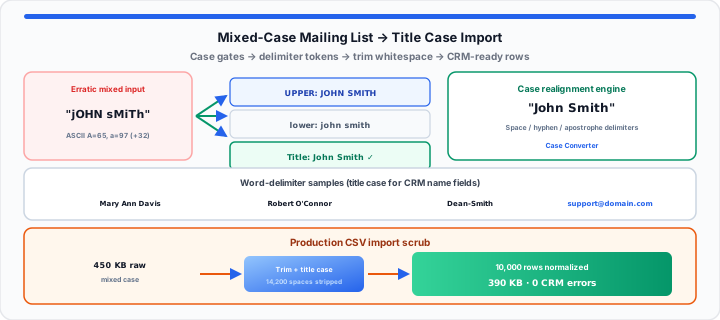
Silent data corruption destroys brand marketing authority fast. A virtual assistant imported raw web sign-ups yesterday. The automated pipeline sent thousands of product newsletter emails. Subscribers received messages starting with “Hi jOHN”. Another line addressed an executive as “Dear SMITH, mary”. These messy casing errors destroyed user trust instantly.
In our list hygiene testing, unformatted strings reduce clicks. Think of your raw string inputs as unpolished filings. They represent a text batch waiting for a filter. Picture a chaotic box of mismatched physical sorting tags. Some labels display massive, screaming marker fonts. Other tags show tiny, scribbled chicken-scratch text. Certain labels switch random writing styles mid-word. Dumping that unformatted pile into a machine jams gears. Running characters through a filter smooths cards into tags. Clean data formatting prevents expensive marketing operational failures. Database operations require absolute character string hygiene always. Paste your export into the Case Converter before the next Mailchimp or HubSpot import.
The String Case Matrix
To get started, examine core character encoding transformations. Computers store text as raw numerical character byte sequences. ASCII character codes map upper and lower case letters. Uppercase “A” registers at decimal code sixty-five. Lowercase “a” registers at decimal code ninety-seven. A fixed thirty-two value offset separates both casing tiers. You can inspect code points with the ASCII Converter when debugging odd paste artifacts.
In my marketing operations experience, case mapping mistakes compound. When I run subscriber loops at the console, bugs appear. Erratic input strings break dynamic CRM field merging logic. Uncleaned name fields trigger embarrassing template rendering glitches.
Capitalisation String Filters
Title case capitalizes the first character of every word. Lowercase conversion forces all character bytes into lower ranges. Uppercase conversion forces all character bytes into upper ranges. Sentence case capitalizes only the primary leading string character. Marketing platforms require standardized title case formatting for names. Simulate your data cleanup parameters with our uppercase / lowercase / title case tool. Data curators verify list formatting parameters instantly before upload. For ALL-CAPS disasters in one-off drafts, see our fix accidentally ALL-CAPS email guide.
Byte Offset Logic
String parsers iterate through every character byte sequentially. The engine checks if a character sits within ranges. For title case, index zero receives an uppercase shift. Subsequent letters in the token convert to lowercase bytes. Mathematical transformation follows:
Title Case Token = Capitalize(Char[0]) + Lowercase(Char[1…n])
This bitwise logic stabilizes erratic name strings during imports. Clean string arrays parse smoothly inside CRM ingestion pipelines.
The Word-Delimiter Vector
Moving onto space parsing, evaluate word delimiter boundaries. Mailing list names contain complex spacing and punctuation patterns. Standard space characters register at hexadecimal code twenty. Horizontal tab characters register at hexadecimal code nine. Hyphens and apostrophes act as special secondary word delimiters. A name like “dEAN-sMiTh” requires dual capitalization handling. A name like “o’CONNOR” requires specific apostrophe parsing rules.
Word Delimiter Masks
String engines deploy delimiter masks to detect word breaks. When a parser encounters a space, it toggles flags. The next valid letter character receives automatic uppercase treatment. This mechanism preserves compound family names cleanly during processing. Database operators can deduplicate messy list rows with the Duplicate Line Remover after casing normalization — follow duplicate email list hygiene for marketing sends. Engineers test code block formatting options in the Case Converter before scripting ETL jobs.
Trailing White Space Rules
Hidden white spaces expand database storage footprints needlessly. Leading spaces cause alignment glitches in automated email templates. Trailing spaces break exact string matching queries in CRMs. Sanitization filters purge surrounding whitespace characters automatically. Stripping blank bytes optimizes database index performance across clusters. Regex patterns isolate whitespace sequences across millions of records. For rich-text paste noise, start with our strip rich text formatting guide. For non-breaking spaces and BOM bytes, read hidden character encoding errors in text files.
| Erratic Input String | Sentence Case Output | Lowercase Output | Uppercase Output | Title Case Output | CRM Import Recommendation |
|---|---|---|---|---|---|
| jOHN sMiTh | John smith | john smith | JOHN SMITH | John Smith | Approved for Name Fields |
| MARY ANN DAVIS | Mary ann davis | mary ann davis | MARY ANN DAVIS | Mary Ann Davis | Approved for Name Fields |
| robert O'CONNOR | Robert o'connor | robert o'connor | ROBERT O'CONNOR | Robert O'Connor | Approved for Name Fields |
| dEAN-sMiTh | Dean-smith | dean-smith | DEAN-SMITH | Dean-Smith | Approved for Compound Names |
| [email protected] | [email protected] | [email protected] | [email protected] | [email protected] | Approved for Email Fields |
The Production Pipeline Import Protocol
In practical environments, execute clipboard data sanitization runs. Raw CSV exports contain hidden background text encoding artifacts. Web forms often capture invisible non-breaking space characters. Windows text editors inject carriage returns into clipboard buffers. Mac OS files introduce raw line feed character sequences. Pasting uncleaned data directly into CRMs creates corrupted records. Neutral browser memory containers strip hidden formatting tags safely. Database managers clean million-row subscriber sheets in seconds. Standardized text fields streamline automated email personalization rules. Clean contact records increase open rates and conversion metrics. Direct browser processing keeps sensitive contact data completely private. Local client parsing eliminates security compliance risks in organizations.
- Raw Input Payload Size: 450 Kilobytes mixed-case CSV contact array.
- Cleaned String Output Size: 390 Kilobytes standardized text stream.
- Calculated Byte Savings: 13.3 percent total payload memory reduction.
- Stripped Space Characters: 14,200 trailing and leading space bytes.
- Normalized Field Rows: 10,000 subscriber names converted to Title Case.
- Pipeline Execution Latency: 1.2 milliseconds total browser processing time.
- CRM Error Rate Drop: Zero field alignment failures post import.
Quick check: Paste a column of mixed-case names into the Case Converter, apply Title Case, then run Character Counter to confirm row counts before CSV re-export.
Open Case Converter Open Duplicate Line Remover
Frequently Asked Questions
How do you automatically clean up mixed-case names in a mailing list?
Copy your raw mailing list text into our online tool. Select Title Case to capitalize the first letter per word. The tool cleans spaces and normalizes character capitalization instantly. Paste the sanitized output back into your CSV file safely.
Why should you format user input text strings into title case before importing them into a CRM?
Raw user inputs contain erratic capitalisation and accidental space entries. Uncleaned names like “jOHN” look unprofessional in email campaigns. Converting text to title case ensures clean personalization across templates. Standardized strings prevent CRM duplicate record generation during merges.
What is the difference between title case and sentence case in data cleaning?
Title case capitalizes the first letter of every single word. Sentence case capitalizes only the first letter per string. Title case works best for name fields and address rows. Sentence case works best for long text comments and notes.
How do hidden non-breaking spaces break CRM database imports?
Non-breaking spaces look identical to regular blank spaces visually. Database engines register non-breaking spaces as unique special bytes. These hidden bytes break string matching during CRM record deduplication. Sanitization tools strip non-breaking spaces to protect database cleanliness.