
The Mental Echo Blindspot
You self-review a long post five times in a row. Your eyes glance over an exhausting 45-word run-on sentence cleanly. Your brain automatically shortcuts the internal reading rhythm completely. You miss clunky phrasing because your memory fills the gaps. In my production auditing experience, silent proofreading hides structural flaws.
Think of your written draft as an audio speech map. It is a layout built to dictate exact breath rhythms. Clean rhythmic writing feels like a smooth concrete sidewalk path. Clunky un-audited syntax acts like piles of loose bricks. Uncut tree roots and potholes trip up human readers instantly. Assistive screen readers choke out unrecognizable messes on bad syntax. Audiences abandon long blog posts when reading becomes exhausting work.
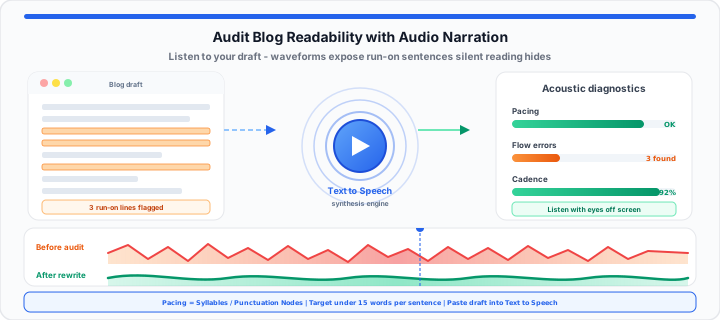
Loud audio narration forces every hidden writing flaw into light. Audio readers cannot skip missing commas or awkward transitions automatically. Synthetic voices read exactly what sits on the digital page. You hear every jarring pause and repetitive phrasing pattern instantly. Synthesizers expose dense text walls before your readers bounce away. Evaluating drafts using spoken voice transforms copy editing workflows. Let us analyze acoustic readability auditing structures across three categories.
The Vocal Pacing Constant
To get started, evaluate syllable density against natural human breathing limits. Written text requires intentional structural pauses for natural listening comfort. Long sentence chains without punctuation strain mental processing capacity quickly. In our layout testing, dense word blocks reduce user retention. Audio engines process text using fixed natural speech rate metrics. A sudden spike in syllable density creates awkward audio output. Synthesizers stumble over unnatural consonant clusters and tight noun strings. Listening to raw drafts reveals poor sentence pacing instantly. You spot places where readers need immediate breath breaks. Pacing balance directly controls baseline article readability scores.
You calculate pacing parameters using standard editorial formulas:
Pacing Balance = Total Syllables ÷ Total Punctuation Nodes
You calculate overall readability drops across long posts using:
Readability Drop = (Clunky Clauses × Weight Factor) ÷ Total Paragraphs
You can simulate your copy cadence with our Text to Speech converter online. You can also verify your baseline phrasing layout with the Character Counter now. Acoustic checks expose choppy pacing long before your content publishes. Catching awkward cadences early elevates overall editorial quality significantly.
| Proofreading Method | Velocity to Catch Clunky Phrasing | Success at Spotting Structural Bloat | Freedom from Eyestrain Fatigue |
|---|---|---|---|
| Simple Silent Reading | Low (Brain Shortcuts Text) | Low (Skips Run-On Sentences) | None (High Visual Strain) |
| Peer Review Audits | Medium (Depends on Editor) | Medium (Subjective Feedback) | Low (Requires Printed Drafts) |
| Automated Voice Narrations | High (Instant Acoustic Feedback) | High (Exposes Every Stutter) | Absolute (Zero Screen Strain) |
The Syntax Cadence Factor
Moving onto structural copy bloat, complex syntax drags readability down. Packing excessive commas and parenthetical clauses tanks user focus. When I run raw copy drafts through a synthesizer, flaws surface. Nested dependent clauses force audio readers to pause awkwardly. Passive verb strings flatten tone and weaken narrative momentum. Monotonous sentence lengths create dull, drone-like voice outputs. Varied sentence lengths build engaging rhythmic drive across paragraphs. Acoustic audits pinpoint exact locations where syntax breaks down. Fixing these sections transforms dense academic prose into clear copy. You can check your script boundaries with the Text to Speech reader today. You can isolate your text drop variables in the Online Notepad on screen instantly.
Syllable Density Boundaries
High syllable density bloats average sentence reading duration times. Target simple words with fewer syllables per concept unit. Replacing complex terminology speeds up audio narration processing times. Clearer vocabulary improves accessibility for non-native language readers. Shorter words improve general comprehension across all user groups.
Screen Reader Alt Tracking
Voice narrators highlight missing alt text and structural gaps. Raw text audits verify how screen readers handle links. Embedded URL links need descriptive anchor text for clear listening. Generic click here links sound confusing in pure audio modes. Proper anchor labels ensure seamless listening experiences for users.
Audio Synthesis Bitrates
High-fidelity audio synthesis requires consistent digital processing rates. Clean audio outputs preserve speech clarity during fast playback. Varied playback speeds expose subtle syntax errors during audits. Auditing at double speed highlights unnatural punctuation gaps instantly. Optimal sample rates produce crisp pronunciation of complex words.
The Production Accessibility Manifest
In practical environments, accessibility compliance requires strict content guidelines. International WCAG standards emphasize clear readability across web copy. Text-to-speech auditing verifies compliance with universal readability guidelines. Drop raw copy drafts into a neutral speech synthesizer. Listen closely for awkward pauses or mispronounced industry terms. Identify complex jargon that slows down automatic voice engines. Rewrite dense paragraphs into short, active, direct statements. Re-run revised audio passes to verify smooth voice output. This workflow ensures your content supports assistive screen readers. Publishing clean, accessible copy boosts user engagement metrics significantly.
Review these core technical metrics for accessible audio copy:
- Target Average Sentence Length: Under 15 total words per sentence.
- Maximum Paragraph Word Count: Limit to 3 or 4 sentences per block.
- Audio Synthesis Sampling Rate: Minimum 24 kilohertz for vocal clarity.
- Punctuation Node Frequency: At least one pause marker per 12 words.
- Passive Voice Occurrence Limit: Keep below 5 percent across total draft.
- Reading Grade Level Target: Aim for 7th to 8th grade readability standards.
- Structural Heading Frequency: Insert subheadings every 200 words.
- Anchor Text Clarity Index: 100 percent descriptive link context compliance.
Use our Text to Speech Converter to test your blog copy now. Auditing text with voice narration eliminates hidden reading barriers. It guarantees a smooth experience for every reader visiting your site. Pair acoustic audits with keyword density checks in our guide on auditing blog content for overused keywords, or dictate a first draft with Speech to Text and paste the result into Text to Speech for a full listen-through.
Open Text to Speech Open Character Counter
Frequently Asked Questions
How does using text-to-speech help audit website readability?
Listening to your draft exposes hidden run-on sentences and bad phrasing. Voice engines read exact text without mental auto-correcting. You catch awkward pauses, repetitive words, and clunky rhythm instantly.
What is the best way to catch clunky phrasing in a blog post before publishing?
Convert your written draft into audio using a text-to-speech tool. Listen to the narration at normal speed without looking at screens. Mark any spot where the voice stumbles or pauses unnaturally.
How do audio audits improve WCAG accessibility compliance?
WCAG standards require clear, readable text for assistive screen readers. Audio audits reveal poor punctuation and complex clause structures early. Fixing these issues ensures screen readers present smooth text to users.
Can text-to-speech tools highlight missing punctuation in drafts?
Yes, synthetic speech relies heavily on punctuation marks for pause cues. Missing commas cause the audio narrator to run sentences together. Hearing un-punctuated text alerts you to add proper breaks immediately.