
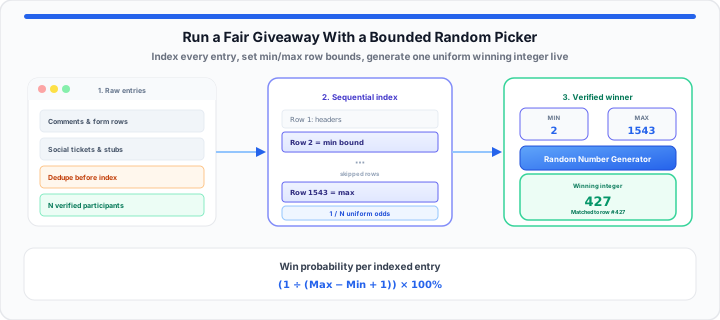
You press “End Stream” or publish your giveaway winner post, and within thirty seconds, your notifications explode. “Rigged.” “He picked his friend.” “Fake contest.” When I’m auditing entry sheets live on stream or overseeing promotional drawings for active online communities, nothing causes more administrative anxiety than an audience suspecting the draw wasn’t fair. Even if you act with complete integrity, picking a winner by scrolling through a comment section with your thumb introduces invisible bias that viewers instantly spot.
Think of a digital random picker like a perfectly weighted physical tombola drum spinning thousands of identical paper tickets. If every ticket has the exact same dimensions, weight, and surface area, the drum cannot prefer one participant over another when the hatch opens. Assigning every entry a unique integer and running those boundaries through a mathematical generator gives your community that exact same structural guarantee: absolute parity across the entire entry pool.
The Fatal Flaw of Manual Selection: Why Humans Make Terrible Random Pickers
Human brains are naturally wired for pattern recognition, not mathematical randomness. When you attempt to pick a winner manually by stopping a scroll on a live video feed, your eye naturally gravitates toward longer usernames, vibrant avatar colors, or comments positioned near the top third of the screen.
In my experience managing promotional drawings, relying on manual clicks creates invisible clusters. Cognitive subconscious bias makes it nearly impossible to distribute selection probability evenly across a list. Mathematical probability works on a strict flat distribution where every position retains identical odds. The calculation for single-draw entry parity is basic:
Win Probability % = (1 ÷ (Max Value − Min Value + 1)) × 100
If your method shifts those odds by even a fraction of a percent toward certain scroll positions, your giveaway loses its structural integrity.
Step-by-Step: Setting Up an Unbiased Numeric Drawing
To get started executing a bulletproof draw that withstands strict audience scrutiny, follow this five-step operational pipeline to prepare your raw entry data:
- Export raw submissions to a unified sheet: Pull all form submissions, social media comments, or ticket purchases into a clean Google Sheet or Excel workbook.
- Purge empty entries and structural blanks: Delete header rows, canceled orders, or corrupt records so that every remaining line contains a valid participant.
- Index entries sequentially from start to finish: Lock your data into sequential numbered rows. Start your participant list at row 2 (if row 1 contains column headers) and note the final filled row number.
- Define your mathematical bounds: Establish your exact boundary range where your minimum value equals your first participant row (e.g., 2) and your maximum value equals your total count ending row (e.g., 1543).
- Execute the random selection live: Input your minimum and maximum values into a digital picker tool, hit generate, and immediately match the resulting integer back to its corresponding row on screen.
Use our Random Number Generator to set min and max to your first and last participant rows, generate once on camera, and read the integer aloud before you scroll to that row. For list cleanup before you index, run duplicate usernames or emails through the Duplicate Line Remover or follow the full CRM hygiene walkthrough in our guide on removing duplicate email entries from marketing lists.
Handling Edge Cases: Excluded Rows and Duplicate Submissions
Moving onto entry list cleaning, multi-post spammers present the single largest threat to giveaway fairness. If a single user submits fifty comments on a post that permits only one entry per person, keeping those extra lines artificially skews their win probability.
Before setting your minimum and maximum numbers, run a deduplication filter on unique user IDs or email addresses. Keep only the earliest timestamped entry for each unique user and delete the remaining duplicate rows. Re-index your spreadsheet immediately so no blank rows break the numerical sequence. If your campaign rules explicitly award extra entries for completing specific tasks (like sharing a post or filling out a survey), assign those bonus entries adjacent block ranges in your spreadsheet so every earned entry maintains a valid, unique row number.
The Campaign Audit Sheet: Organizing Entry Fields
Depending on the scale of your campaign, your lower and upper entry bounds will vary dramatically. In our community giveaway testing, structuring entry parameters ahead of time prevents live-stream calculation errors. Below is an operational breakdown for organizing different entry environments:
| Entry Source / Platform | Identification Method | Index Range Setup | Min Value | Max Value |
|---|---|---|---|---|
| Small Discord / Live Stream | Manual Chat List / Roll Form | Individual Username Rows | 1 | Total Active Members |
| Spreadsheet Raffle (Google Sheets) | Row Number (Header at Row 1) | Data Rows 2 through N | 2 | Last Filled Row Number |
| Gleam / Rafflecopter Export | Unique Serial Entry ID | Cleaned CSV Index Column | 1 | Total Verified Entries |
| Physical Event Ticket Stubs | Printed Serial Numbers | Continuous Ticket Batch | First Serial No. | Last Serial No. |
| Multi-Tier Community Campaign | Weighted Block Assignments | Total Sum of Earned Tickets | 1 | Total Accumulated Tickets |
After exports land in one column, you can sort the participant list alphabetically for a quick visual duplicate scan, then re-number rows before you lock min and max for the live draw.
Transparency Workflows: How to Prove Your Drawing is 100% Legit
In practical environments, running a mathematically fair draw is only half the battle—you also need to prove it to your community. Audit trail transparency is what separates smooth campaigns from comment-section disasters.
When hosting a drawing, record your full screen or stream the selection process live. Show your spreadsheet with the total row count visible, highlight the top and bottom bounds, and show the exact moment you generate the winning seed. To build absolute trust, instead of manually shuffling index cards by hand or risking chat-room pushback by guessing a winner on a live stream, copy your entry pool size directly into our interactive Random Number Generator to select an unbiased winning ticket instantly. Always publish the unedited screen capture alongside the winner announcement so participants can verify their row number against the winning output.
Open Random Number Generator Open Duplicate Line Remover
Frequently Asked Questions
How do you assign random numbers to a list of names in a spreadsheet?
In Google Sheets or Excel, keep your names in Column A and let the native row numbers serve as each participant’s static ID (starting at row 2 if row 1 contains headers). Alternatively, insert a new column to the left of your names and type =SEQUENCE(COUNTA(B2:B)) in cell A2 to automatically generate a sequential numbering sequence from 1 to your total entry count.
What is the difference between a true random picker and a pseudo-random number algorithm for giveaways?
True random generators rely on physical atmospheric noise to select numbers, whereas software-based pseudo-random number generators use mathematical algorithms driven by an initial seed value. For social media giveaways, raffles, and community promotions, a standard pseudo-random algorithm provides complete mathematical fairness, as the resulting outputs are evenly distributed and entirely unpredictable by human participants.
How can you prevent a single participant from winning multiple prizes in a single numeric drawing?
To run a multi-prize drawing without duplicate winners, execute your first draw to select the grand prize winner. Record the winning row, then immediately remove or strike through that participant’s entries in your master spreadsheet. Re-index your entry list to close any numerical gaps, adjust your upper boundary limit down by the number of removed entries, and run the generator again for the next prize tier.