
You can hold a ninety-five percent raw average on every minor homework assignment—then watch a forty percent final exam drop your course grade to a C minus overnight. Simple score averages treat every task as equal; your syllabus rarely does. Homework is a light box on the scale; a final exam is the anvil. This guide walks the weighted matrix schools actually use, then lets you check rows fast with RapidRatio’s What-If Grade Calculator and weighted-average calculator.
If you already know the pattern from our ultimate weighted final grade guide, this article focuses on unequal assignments inside categories and mid-semester divisors that LMS exports sometimes get wrong.
Weighted grades, not simple averages
Most classes use weights, not add-and-divide averages. Each syllabus category carries an allocation fraction; your course percentage is built from weighted products, not from treating a quiz and a final as the same size bucket. grading reference
The standard form is:
Weighted Average = Σ(Scorei × Weighti) ÷ ΣWeighti
Each category contribution is also written as:
Final Grade Component = Raw Percentage × Allocation Decimal
Convert percentage weights to decimals before multiplying (30% → 0.30). Ninety percent times 0.30 yields twenty-seven product points toward your course total. Percentage Calculator helps when you are converting syllabus lines to decimals.
Step 1: Build weighted products for each category
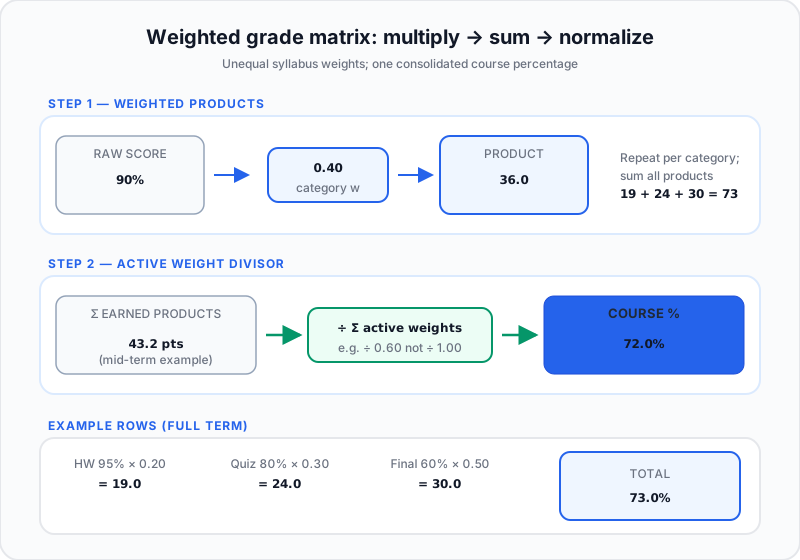
Multiply each category percentage by its decimal weight. Sum every product. When weights already total 100%, that sum is your course grade. When they do not—mid-semester—you renormalize (Step 2).
Students often add raw percentages without scaling; that is the fastest way to misread standing. Cross-check hand work with the manual weighted grade walkthrough or plug categories into the Grade Calculator.
Final exam weight ceilings
A thirty-five percent final dominates the outcome. Strong minor-task scores add few total points; a bad final erases them. Track ceiling weights early and pair this with what grade you need on your final.
Percentage scale bounds
Standard scales cap at one hundred. Bonus credit can push totals above that baseline; keep numerator and denominator on the same scale. After the course closes, roll semester results through the GPA Calculator when you need term GPA context.
| Syllabus category | Sample score | Weight | Weighted product | Impact |
|---|---|---|---|---|
| Homework | 95% average | 20% (0.20) | 19.0 points | High accuracy, limited final weight |
| Quizzes & midterm | 80% average | 30% (0.30) | 24.0 points | Mid-semester stability |
| Final capstone exam | 60% exam score | 50% (0.50) | 30.0 points | Heavy drag on cumulative mark |
Sum of products: 73.0% for the course—not the misleading unweighted average of 95%, 80%, and 60%.
Step 2: Renormalize when the term is incomplete
Mid-semester transcripts use incomplete weight totals. Dividing earned products by one hundred before every category posts creates artificial drops. Sum active weight fractions first. If sixty percent of syllabus weight is in play, divide earned products by 0.60 to express a fair hundred-point trajectory.
Future assignments stay out of the divisor until scores post. Compare LMS behavior with points vs. percentages for finals when your gradebook mixes models.
Incomplete task penalties
Missing work usually scores zero but still counts at full category weight in the divisor. Zeros hurt more than a low score on a small task. For point-based homework buckets that feed a weighted category, aggregate earned ÷ possible inside the category first—see the notebook method for total points.
Step 3: Aggregate uneven homework before you weight it
Five homework tasks with different point values cannot be averaged as raw percentages. Total earned points in the homework category ÷ total possible points yields the category percentage; then multiply by syllabus weight.
- Homework category total: 180 earned out of 200 possible.
- Category percentage: 180 ÷ 200 = 90%.
- Syllabus allocation: homework 15% → 90% × 0.15 = 13.5 product points.
- Midterm product: 82% × 0.25 = 20.5.
- Project product: 95% × 0.20 = 19.0.
- Final exam product: 78% × 0.40 = 31.2.
- Consolidated course grade: 13.5 + 20.5 + 19.0 + 31.2 = 84.2%.
Common mistakes when weights are unequal
- Averaging raw assignment percentages instead of pooling points inside each category first.
- Forgetting decimal weights (using 30 instead of 0.30).
- Dividing by 100 mid-term when only part of the syllabus weight is active.
- Double-counting the final in both a running average and a weighted final row.
If borders matter, keep extra decimals until the last line—same advice as our RapidRatio weighted average calculator workflows.
When to double-check with RapidRatio’s What-If Grade Calculator
Manual products match what grade tools compute internally. Use the planner to:
- Enter each category score and weight without retyping formulas.
- Test final-exam scenarios once the heavy weights post.
- Compare required final scores against your target course grade.
Need a pass/fail floor? See what score you need on your final to pass.
FAQ
- How do you calculate a weighted grade average from different assignment weights?
- Multiply each raw score by its weight fraction, sum the weighted products, and divide by the sum of active weights used in that calculation.
- Why does a final exam score affect your overall grade matrix more than regular homework?
- Larger weight multipliers amplify a single exam score; homework weights cap how much routine work can cushion a bad final.
- How do you calculate your grade when syllabus weights do not add up to 100% yet?
- Sum earned products for posted categories, sum their weight decimals, then divide products by that active weight sum to renormalize.
- What is the difference between an unweighted average and a weighted average grade?
- Unweighted averages treat every score equally; weighted averages scale each score by syllabus importance before combining.