
If your teacher says your grade is “450 out of 500 points” and your final is “worth 100 points,” most finals calculator flows feel less obvious. The gradebook is in points, while many tools want percentages. This article shows how to move comfortably between the two so your inputs match your syllabus—then plug clean numbers into RapidRatio’s Finals Grade Calculator.
Why total points vs. percentages trips people up
Teachers usually structure grades in one of two ways:
- Total points system: every assignment has a point value. Course % ≈ (Total points earned ÷ Total points possible) × 100.
- Weighted percentage system: categories (homework, quizzes, exams) each carry syllabus weights; your course % is a weighted average of category percentages (see our weighted final grade guide).
Point-based syllabi feel concrete (“410/500”), but final exam calculators often assume a current percentage (“82%”). Converting between them is one division and one multiply once you separate completed work from unfinished finals columns.
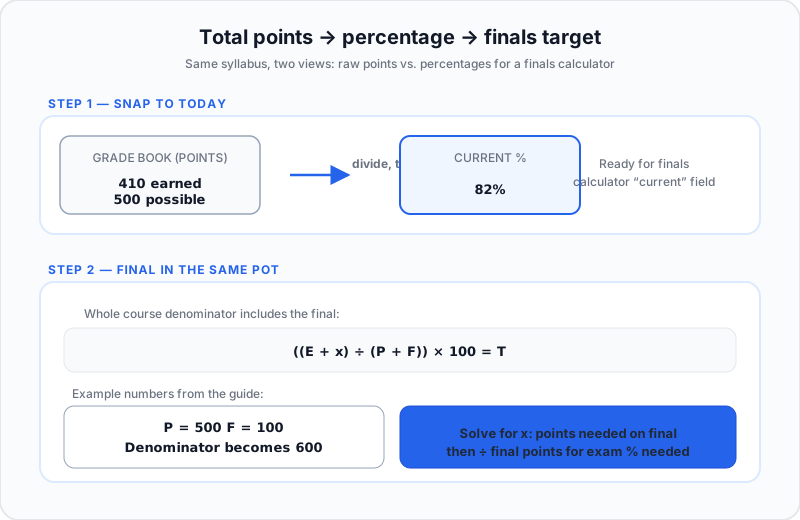
How to convert total accumulated points into a percentage
Step 1: Add up your earned and possible points
From your gradebook:
- Total points earned so far across graded items.
- Total points possible so far for those same items.
Example: homework and tests combined → 410 points earned out of 500 possible.
Step 2: Use the percentage formula
Current % = (Total earned ÷ Total possible) × 100
410 ÷ 500 × 100 = 82%
That 82% plugs straight into weighted final test calculator workflows that expect a running course percentage before the last exam posts.
Step 3: Check that the final is not already counted
If LMS shows an empty “Final” column, exclude it until it is scored—or your denominator jumps early. Related: notebook method for total points.
How to calculate what percentage you need on a point-based final
All points live in one pool—including the final. Call E points earned so far, P points possible so far, the final worth F points, and target overall course percent T after the exam (for example 80 for 80%).
After the exam: total earned is E + x, total possible is P + F, where x is your final exam score in points.
((E + x) ÷ (P + F)) × 100 = T
Solve for x (points needed on the final).
Worked example
- E = 410, P = 500, F = 100, target T = 80%
(410 + x) ÷ 600 × 100 = 80 → (410 + x) ÷ 600 = 0.80 → 410 + x = 480 → x = 70
You need 70 points out of 100 on the final—70% on that exam—to land at 80% overall. That algebra is exactly what robust final exams calculator logic does internally.
When the course uses weighted percentages but tracks points per category
Hybrid setup:
- Syllabus: Homework 20%, Quizzes 20%, Midterm 30%, Final 30%
- Inside each bucket: use points → category %
Category % = (earned in category ÷ possible in category) × 100
Across categories: Course % = H×0.20 + Q×0.20 + M×0.30 + F×0.30 —with H, Q, M, F standing for each category percentage. WikiHow weighted average
A calculator either stays in pure points mode (410/600 style above) or normalizes buckets then applies weights—know which mirror your instructor uses.
How a good finals calculator handles both points and percentages
Mode 1: Points-based input
Inputs: E, P, final points F, target T, or hypothetical final points x:
- Derive Current % with (E ÷ P) × 100 whenever you need a percentage snapshot.
- Solve ((E + x) ÷ (P + F)) × 100 = T for x, or fix x to project your overall percentage.
Mode 2: Percentage-based input
Inputs: current course %, final weight w as a decimal, plus target or hypothetical final exam %:
Course % = Current × (1 − w) + Final × w
Same idea as RogerHub-style tools—see RogerHub final grade calculator—matching RapidRatio rows when your syllabus is weight-based rather than pure single pot.
Use Open Finals Grade Calculator for rapid what-ifs once you translate points → % correctly.
Quick checklist: which mode should you use?
- Teacher quotes points (“410/500”) → points thinking first.
- Teacher quotes syllabus % per category or final (“final 30%”) → weighted percentage mode.
- Required vs projected: solve for final points x when you chase a hard target—or plug a tentative final score to see where you land.
FAQ
- How do I convert my total accumulated points into a percentage grade?
- Divide points earned by points possible so far, multiply by 100—for example (450 ÷ 500) × 100 = 90%.
- How do you calculate what you need on a final test using points?
- Set up (E + x) ÷ (P + F) × 100 equal to your target course % and solve for x; or subtract your earned total from your point goal for the course if your instructor publishes fixed point thresholds.
- Can a finals calculator process both weighted percentages and raw point totals?
- Yes—with the caveat that pure points-in-one-pot math and multi-category weighted math are different models. RapidRatio’s Finals Grade Calculator shines when your syllabus is expressed as weighted rows; combine it with point→% conversion from this guide for hybrid LMS exports.
References
- RogerHub final grade calculator
- Ontario Tech grade calculator
- College Raptor: weighted vs. unweighted GPA
- MyEvaluationPal: GPA scale explained
- LAEP GPA conversion chart (PDF)